
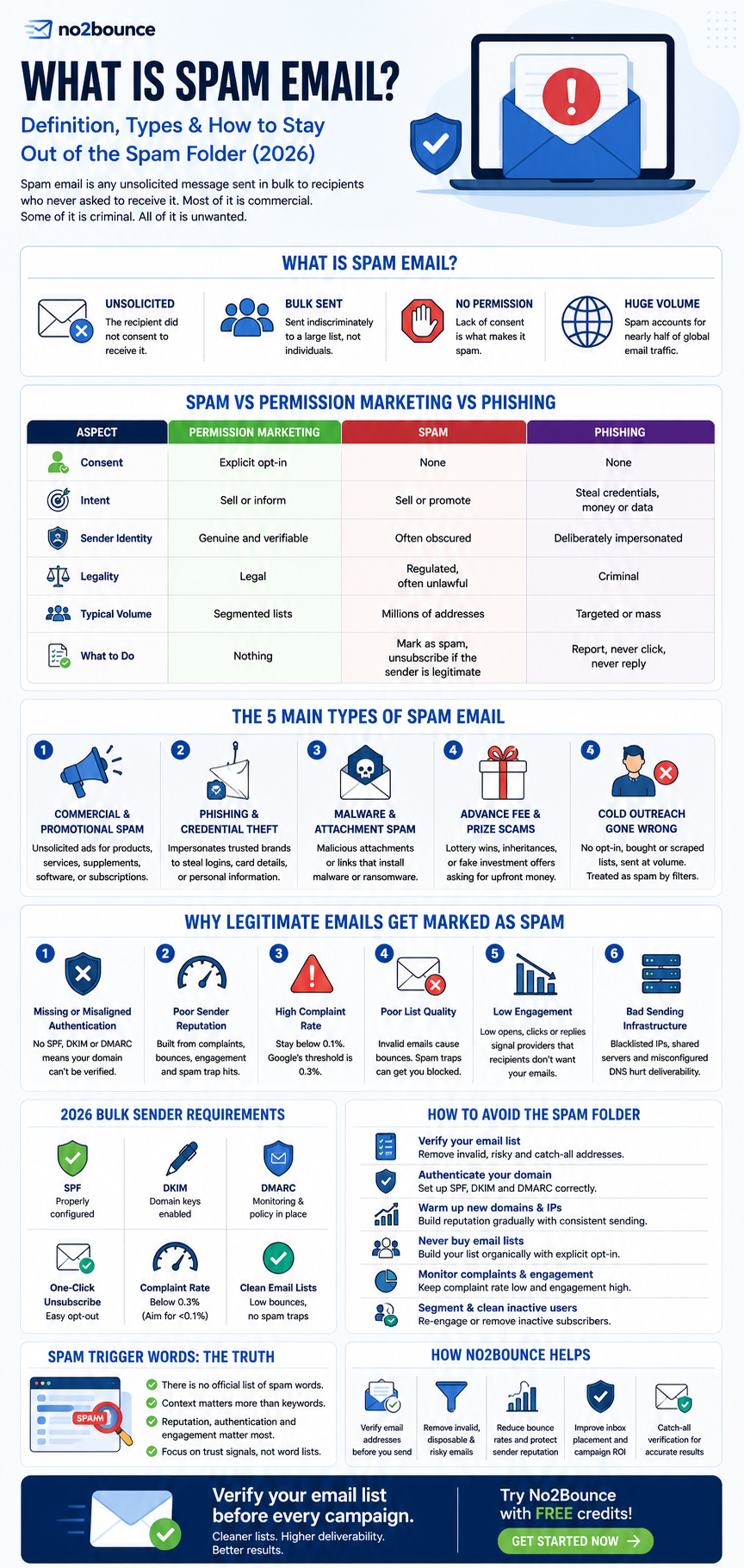
Spam email is any unsolicited message sent in bulk to recipients who never asked to receive it. Most of it is commercial. Some of it is criminal. All of it is unwanted, which is precisely what makes something spam rather than marketing.
But there is a second, more expensive version of this problem, and it is the one that brings most people to this page. You are not receiving spam. You are sending legitimate email, with permission, to people who signed up, and it is landing in the spam folder anyway.
This guide covers both. What spam actually is, how it differs from marketing and phishing, why mailbox providers filter messages the way they do, and what you can control to make sure your email reaches the inbox.
What is spam email?
Spam email, also called junk email, is unsolicited bulk email. Two conditions have to be met. The message has to be unsolicited, meaning the recipient did not consent to receive it. And it has to be bulk, meaning it was sent indiscriminately to a large list rather than written for an individual.
Content is not part of the definition. A perfectly polite, well designed, entirely honest newsletter sent to 50,000 people who never opted in is spam. A blunt, ugly one-line email sent to someone who requested it is not.
Volume estimates vary by source, but spam consistently accounts for somewhere close to half of all email traffic worldwide, running into the hundreds of billions of messages per day. That scale is why mailbox providers filter so aggressively, and why the burden of proof sits with the sender rather than the filter.
Spam is also a legal category. In the United States, the CAN-SPAM Act of 2003 sets rules for commercial email covering accurate headers, honest subject lines, a physical postal address and a working unsubscribe mechanism. The UK and EU take a stricter line under PECR and GDPR, where consent is generally required before you send at all, rather than an opt-out being sufficient.
Spam vs permission marketing vs phishing
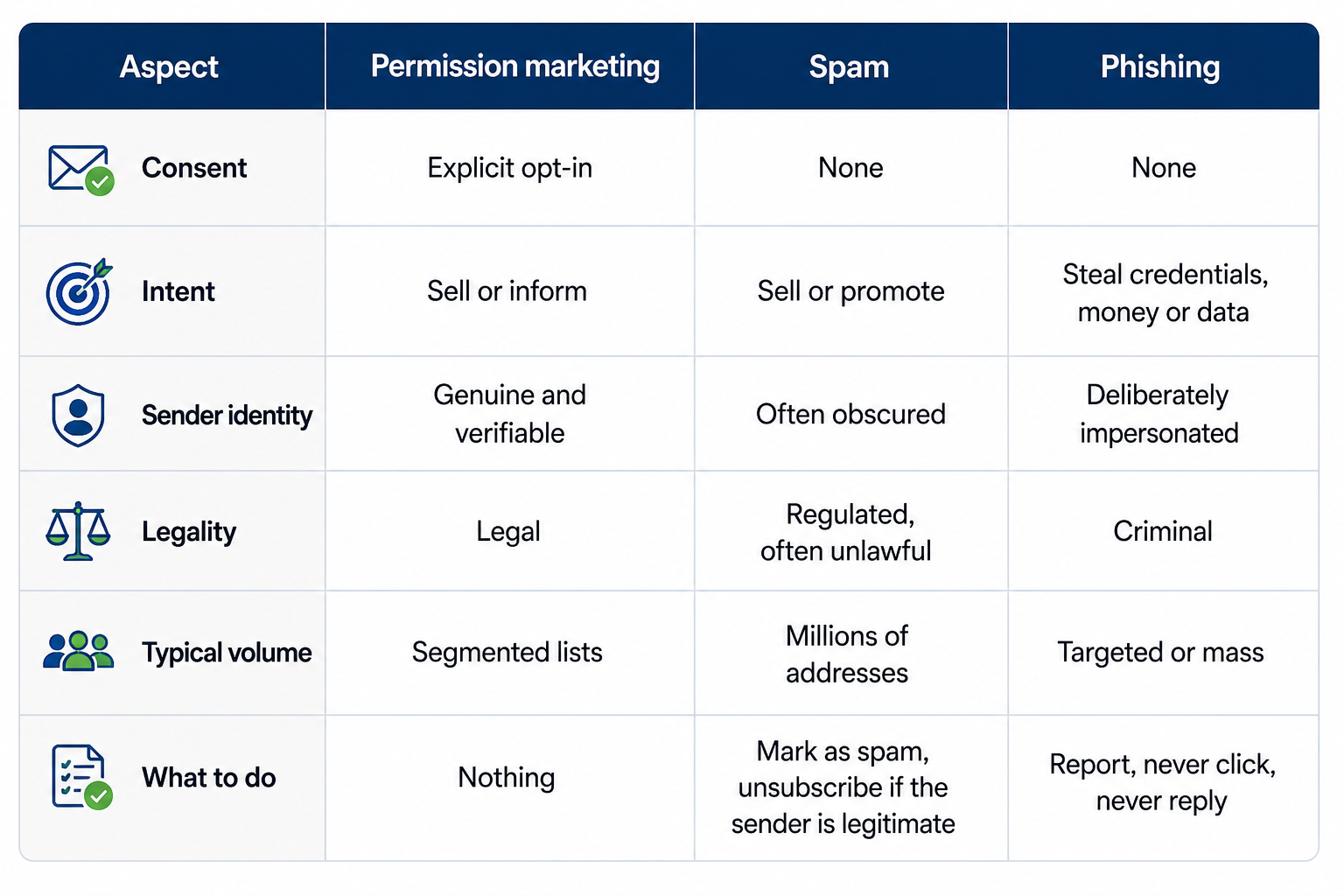
These three get conflated constantly, and the distinction matters because the remedy for each is different.
The practical difference between spam and phishing is intent. Spam wants your attention. Phishing wants your credentials. A spam message that promotes a dubious supplement is annoying. A phishing message that clones your bank's login page is an attack.
The practical difference between spam and permission marketing is consent, and consent alone. This is worth internalising if you run campaigns, because a sender can do everything else right and still be spamming.
The main types of spam email
Commercial and promotional spam
The largest category by volume. Unsolicited advertising for products, services, supplements, software or subscriptions. Generally not dangerous, but it is what most spam filters are tuned to catch first.
Phishing and credential theft
Messages that impersonate a trusted brand to harvest logins, card details or personal data. Banks, delivery firms, tax authorities and cloud providers are the most commonly spoofed. These are the reason mailbox providers now insist on domain authentication.
Malware and attachment spam
Emails carrying malicious attachments or links that install ransomware, keyloggers or remote access tools. Often disguised as invoices, purchase orders, CVs or shipping notifications, because those are the attachments people open without thinking.
Advance fee and prize scams
Lottery wins you did not enter, inheritances from relatives you do not have, investment opportunities requiring a small upfront transfer. Old, still circulating, still effective enough to be worth sending.
Cold outreach that has drifted into spam
The category most B2B teams fall into without meaning to. Purchased lists, scraped addresses, no opt-in, no genuine research, sent at volume from a domain with no authentication. Legally grey in the US, generally unlawful in the UK and EU when sent to individuals, and treated as spam by filters regardless of how the sender feels about it.
Why legitimate emails get marked as spam
This is where most senders actually need help. Modern filters do not read your email and decide whether it seems spammy. They evaluate a stack of signals, and content sits near the bottom of that stack.
Authentication is missing or misaligned. If a mailbox provider cannot cryptographically confirm that your domain authorised the message, it has no reason to trust it. SPF, DKIM and DMARC are no longer best practice. For any sender at volume they are a hard requirement, and failing them is now the single fastest route to the junk folder.
Your sender reputation is damaged. Every sending domain and IP carries a sender reputation score built from complaint rates, bounce rates, engagement and spam trap hits. Reputation is slow to build and fast to lose. One bad send to a stale list can undo months of consistent sending.
Your complaint rate is too high. When recipients hit the spam button, that signal goes straight back to the mailbox provider. Google's published threshold is 0.3 percent of messages reported as spam, with a strong recommendation to stay below 0.1 percent. Cross it and filtering applies to your whole domain, not just the offending campaign.
Your list quality is poor. Invalid addresses generate hard bounces. High bounce rates signal that you are not managing your list, which providers read as a hallmark of bulk senders who acquired their data rather than earned it. Worse, abandoned addresses get recycled into spam traps, and hitting a trap can trigger a blocklisting outright.
Engagement is falling. Opens, replies, clicks, moving a message out of junk, adding a sender to contacts. These are positive signals. Deleting without reading is a negative one. A list that has stopped engaging will gradually stop reaching the inbox even if nothing else changes.
The infrastructure is wrong for the volume. New domains sending at high volume from day one, shared IPs with poor neighbours, no warm-up period, or a mismatch between your From domain and your sending infrastructure will all cost you placement.
The bulk sender requirements you need to meet in 2026
Between 2024 and 2025 the three largest mailbox providers moved from recommending authentication to enforcing it. If you send at any meaningful volume, this is the baseline.
Google and Yahoo introduced their requirements in February 2024. Senders of 5,000 or more messages a day to Gmail accounts must authenticate with SPF, DKIM and DMARC, provide one-click unsubscribe via the List-Unsubscribe header, honour unsubscribe requests within two days, and keep spam complaint rates below the 0.3 percent threshold.
Microsoft followed on 5 May 2025 with rules for senders of 5,000 or more messages a day to its consumer domains, including outlook.com, hotmail.com and live.com. Those senders must pass SPF and DKIM and publish a DMARC record at a minimum policy of p=none, aligned with SPF or DKIM. Microsoft announced that non-compliant messages would be rejected with a 5.7.515 authentication error, and said it would begin by routing high-volume non-compliant mail to the Junk folder to give senders a window to fix their setup.
Alongside authentication, Microsoft explicitly named list hygiene and bounce management as a requirement for large senders, calling for the regular removal of invalid addresses to reduce complaints, bounces and wasted sends. It also asked for a valid, reply-capable From and Reply-To address and a clearly visible unsubscribe option.
The direction of travel across all three providers is identical. Prove who you are, make it easy to leave, and keep your list clean. Two of those are one-off configuration tasks. The third is ongoing, and it is where most senders quietly fail.
How to stop receiving spam
If you are on the receiving end rather than the sending end, a few habits do most of the work.
Mark it as spam rather than deleting it. Deleting removes the message. Marking it trains the filter, for you and for everyone else on the platform.
Do not reply, and do not click "unsubscribe" on anything suspicious. With genuine senders, unsubscribe works and is legally required. With actual spam, any interaction confirms your address is live and monitored, which makes it more valuable to the next list buyer.
Use an alias for signups. Many providers let you add a suffix to your address. If spam starts arriving at that alias, you know exactly which service leaked or sold your data.
Never post your address in plain text publicly. Harvesting scripts scrape forums, directories and web pages continuously.
Enable your provider's filtering properly. Gmail, Outlook and Apple Mail all have stronger filtering settings than the defaults, and most people never turn them on.
How to keep your emails out of the spam folder
A working checklist, ordered roughly by impact. Several of these are covered in more depth in our guide to spam prevention strategies.
- Set up SPF, DKIM and DMARC properly, and confirm alignment. Publishing the records is not the same as passing them. Test with a live send and read the headers.
- Verify every address before you send. Removing invalid, risky and disposable addresses prevents hard bounces, protects your reputation and satisfies the list hygiene requirement that all three major providers now name explicitly.
- Never send to a purchased or scraped list. There is no configuration that saves you from this. It is the fastest way to hit spam traps and lose your domain reputation.
- Warm up new domains and IPs gradually. Start small, increase volume steadily, and give reputation time to build before your first large campaign.
- Include one-click, unsubscribe and honour it within two days. This is now a requirement, not a courtesy.
- Monitor your complaint rate. Google Postmaster Tools and Microsoft SNDS both give you visibility, and it is worth tracking alongside your other campaign metrics. Watch for the trend, not just the number.
- Segment by engagement and sunset inactive contacts. Continuing to mail people who have not opened anything in a year actively damages your placement with the people who do open.
- Use a consistent, authenticated sending domain. Frequent switching resets your reputation and looks evasive.
- Write a subject line that matches the body. Misleading subject lines drive complaints, and complaints are the signal that matters.
- Keep the message simple. Fewer images, fewer links, a real text-to-image balance and a plain-text version. Heavy, image-only templates still underperform.
Do spam trigger words still matter?
Less than almost every article on this topic claims.
The advice to avoid words like "free", "guarantee" or "act now" comes from an era when filters were largely keyword and rule based. Filters today are machine learning systems weighting authentication status, domain and IP reputation, complaint rates, engagement history and structural signals far more heavily than individual word choices. Retailers send campaigns with "free shipping" in the subject line every week and reach the inbox, because everything else about their sending is trusted.
That does not make content irrelevant. Heavy use of urgency language, all caps, excessive punctuation, hidden text and link shorteners still correlates with spam and still contributes to scoring. But a sender with clean authentication, a verified list and a low complaint rate can use the word "free" without consequence, while a sender with none of those things will land in junk writing the most careful copy imaginable.
Fix reputation first. Worry about wording last.
Where the word "spam" came from
Hormel Foods launched SPAM, the canned pork product, in 1937. In 1970 a Monty Python sketch featured a cafe where nearly every dish contained Spam, with a group of Vikings drowning out the dialogue by chanting the word repeatedly. That image, something unwanted repeated until it crowds out everything else, stuck. Early internet users adopted it for disruptive posts in the 1980s, and by the 1990s it had settled on unsolicited bulk email.
The word is not an acronym. Backronyms like "Stupid Pointless Annoying Mail" were invented afterwards as jokes. Even for the meat, the "spiced ham" explanation is widely repeated but has never been officially confirmed by Hormel.
Keeping your list clean with no2bounce
Of everything on the checklist above, authentication is a one-time setup. List hygiene is not. Addresses go stale, people change jobs, typos slip into forms, and abandoned mailboxes get recycled into spam traps.
That is the part no2bounce handles. Verifying your list before each send removes invalid, risky and inactive addresses, keeps your bounce rate low, and protects the sender reputation that determines whether the rest of your work reaches anyone. It also covers catch-all domains, which most verification tools return as "unknown" and leave you guessing about.
You can test it on your own list with free credits, no card required, and see how much of your data is actually deliverable before your next campaign goes out.
Frequently asked questions
What is the difference between spam and phishing?
Spam is unsolicited bulk email sent to get attention, usually commercial and usually harmless beyond the nuisance. Phishing is a targeted attempt to steal credentials, money or personal data by impersonating a trusted organisation. All phishing is unwanted, but not all spam is an attack. Phishing is a crime; ordinary spam is a regulatory matter.
Why are my emails going to spam when I have permission?
Consent is only one of the signals filters evaluate. The most common causes are missing or misaligned SPF, DKIM and DMARC records, a high bounce rate from unverified addresses, a spam complaint rate above 0.3 percent, low engagement across the list, or sending at volume from a domain that has not been warmed up. Permission protects you legally, but it does not on its own prove to a mailbox provider that you are trustworthy.
What is an acceptable spam complaint rate?
Google's published threshold is 0.3 percent of messages reported as spam, and it recommends staying below 0.1 percent. Above 0.3 percent, filtering can be applied at the domain level, affecting every campaign you send rather than just the one that caused the problem.
Does marking an email as spam block the sender?
It usually stops future messages from that sender reaching your inbox, but its more important function is training the filter. The complaint is reported back to the mailbox provider and counts against that sender's reputation across all recipients, which is why complaint rate is such a heavily weighted deliverability signal.
Where did the term spam come from?
From a 1970 Monty Python sketch in which the word was repeated until it drowned out everything else, which early internet users adopted as shorthand for disruptive, repetitive messages. It is not an acronym, despite the various joke expansions in circulation.
Start cleaning your list instantly.
No credit card required.