.jpg)
Connecting your CRM to your email platform is not the same as protecting your list. Most integration guides walk through authentication, field mapping, and which objects sync where. What they rarely cover is what happens to a bad email address after it lands in your CRM: whether it gets flagged, whether that flag travels back to your sending tool, and whether it quietly gets re-imported six months later by someone running a routine export.
This is the piece meant to sit alongside your HubSpot, Salesforce, and Zoho integration setup, not replace it. It covers the automation layer that keeps a synced CRM from becoming a slow leak in your list hygiene.
Why Sync Alone Does Not Protect List Hygiene
A typical CRM-to-ESP integration moves data in one direction with confidence: new lead comes in, it syncs to the CRM, marketing pulls a segment, campaign goes out. What most setups do not handle well is the return trip. When an address bounces, gets marked as a spam trap, or is suppressed at the sending platform, that status needs to travel back into the CRM just as reliably as the original contact record traveled out.
Without that return trip, three things happen repeatedly:
- A rep or automation re-adds a suppressed contact to a list because the CRM never knew it was suppressed
- A stale segment gets re-exported for a campaign, reintroducing addresses that were cleaned out of the ESP months earlier
- Two systems disagree about a contact's status, and whichever one runs the next campaign wins by default, not by design
None of this is an integration failure in the technical sense. The sync is working exactly as configured. It is a list hygiene design gap, and it needs its own automation layer on top of the basic sync.
The Automation Patterns That Actually Protect Your List
1. Validate at the point of capture, not after
The cheapest place to catch a bad address is before it ever becomes a CRM record. A real-time validation check at the form or lead-capture step, wired into your CRM's automation engine, stops invalid and disposable addresses from entering the sync pipeline at all, rather than needing to be cleaned out downstream. The difference between checking at that moment versus checking later is mostly about timing, not accuracy, and timing is what determines whether a bad address ever reaches your CRM at all.
2. Write hygiene status back to the CRM, not just the ESP
If your validation or bounce data only lives in your email platform, every other system that touches that contact (sales, support, marketing automation) is working from a blind spot. A dedicated CRM field for hygiene status, such as valid, risky, or suppressed, updated automatically whenever a check runs, keeps every downstream automation honest. This is the core idea behind building verification into your automation stack rather than treating it as a separate cleanup step.
3. Suppress bidirectionally, not just outbound
Suppression needs to work both ways. When an address is suppressed in your CRM, your automation should stop it from being re-synced to the ESP as active. When it is suppressed at the ESP, that status should flow back and update the CRM record, so a sales rep or a re-engagement workflow does not accidentally reactivate it.
4. Re-verify on a schedule, not just on entry
A contact that was valid a year ago is not guaranteed to be valid today. A scheduled bulk re-verification of dormant or aging segments before they are reused catches addresses that have quietly gone stale since their last check, the same mechanism that turns real inboxes into recycled spam traps.
5. Tie deduplication rules to a single source of truth for email
Sync automations create duplicate records more often than manual entry does, especially when matching rules differ slightly between systems. Standardizing on exact-match email as the primary dedup key, and reconciling conflicting values through automation rather than manual merge, keeps hygiene status from getting split across two records for the same person.
The Platform-Specific Angle
HubSpot
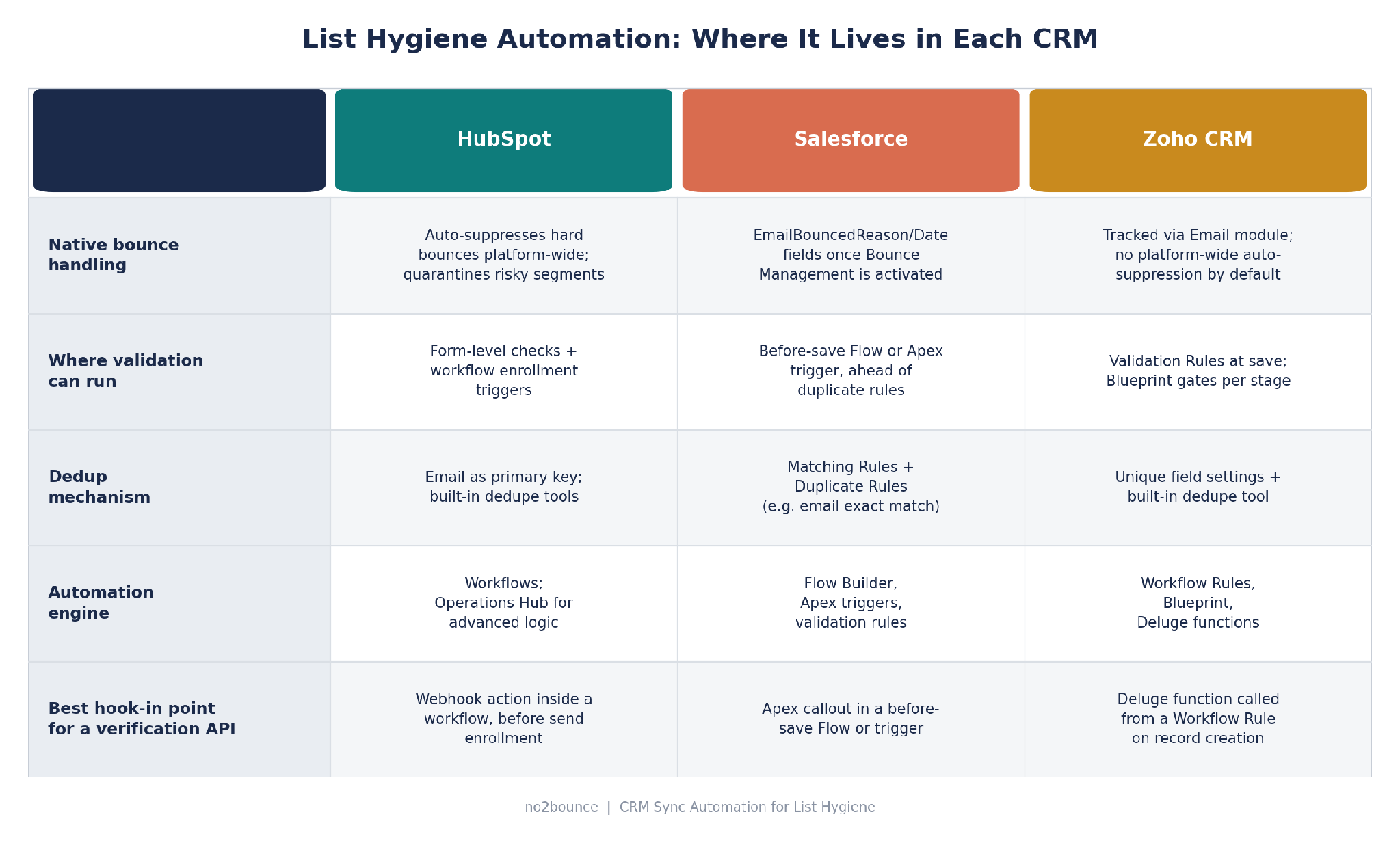
HubSpot automatically suppresses future marketing sends to contacts with a known hard bounce reason, and can quarantine entire imported segments or sends that trigger unusually high bounce rates. That native suppression is a strong baseline, but it only covers HubSpot's own sending. The gap to close with automation is upstream: use workflow enrollment triggers, whether filter-based or event-based, to route new or re-engaged contacts through a validation check before they ever reach a sending workflow, and maintain an active suppression list that other workflows reference so hygiene status stays consistent across every automation, not just the default marketing send.
Salesforce
Salesforce ships standard fields, EmailBouncedReason, EmailBouncedDate, and IsEmailBounced, on Lead and Contact once Bounce Management is turned on in Setup, but it does not suppress future sends on its own the way HubSpot does; that logic has to be built. The natural place to add validation is a before-save Flow or an Apex trigger, since Salesforce's order of execution runs before-triggers and most custom validation ahead of duplicate rules, meaning a validation check can catch and flag a bad address before it ever reaches the deduplication step. Pairing that with a Matching Rule on exact-match email keeps synced records from fragmenting into duplicates with different hygiene statuses.
Zoho CRM
Zoho separates its automation tools by intent: Workflow Rules run automatically in the background on an event, Validation Rules enforce data quality at save, and Blueprint enforces a stage-by-stage process that requires a human to advance it. For list hygiene, Validation Rules are the right layer for catching malformed addresses at entry, while a Workflow Rule calling a Deluge function is the right layer for an external validation API check on record creation or update, since Deluge can make the REST call and write the result back to a custom field. Blueprint is worth adding only if you want a human checkpoint, such as manual review of a flagged contact, before it is allowed to re-enter an active segment.
Common Pitfalls in CRM Hygiene Automation
- Sync loops. A hygiene field update in the CRM triggers a re-sync to the ESP, which triggers a status update back to the CRM, which re-triggers the original automation. Build in a change-detection check or a do not re-trigger flag before writing automation that fires on field updates.
- Silent re-imports. A saved list view, report export, or bulk upload does not check current suppression status unless that check is explicitly built into the import step. Treat every import path, not just the primary sync, as a place bad addresses can re-enter.
- Field mapping mismatches. If a hygiene status field is named differently, or uses different picklist values, across the CRM and the ESP, an automation reading one system's status against the other will silently fail. Map field values explicitly and test with edge cases, not just a clean sample record.
- One-way trust. Deciding which system “wins” when two systems disagree about a contact's status needs to be an explicit rule, not whichever automation happens to run last.
A Setup Checklist
- Pick one hygiene status field and mirror it, by name and by value, in both the CRM and the ESP.
- Add a capture-time validation check on your lead and contact forms before records reach the CRM, using a verification API wired into the form or automation step.
- Wire bounce and suppression data back to the CRM using the platform's native bounce fields or workflow actions, not just the ESP's own list.
- Audit every import path (bulk upload, list export, manual add) for whether it respects current suppression status.
- Schedule re-verification for segments older than 6–12 months before they are reused in a campaign.
- Document the source-of-truth rule for what happens when the CRM and the ESP disagree about a contact's status.
FAQ
Does turning on native bounce handling in my CRM replace the need for a validation tool?
No. Native bounce fields tell you an address failed after you already sent to it. A validation check run at capture or before a scheduled send catches many of those same addresses before they cost you a send and a reputation hit.
Which system should be the source of truth for suppression status?
There is no universally correct answer, but there needs to be a chosen one. Many teams treat the sending platform as the source of truth for bounce and complaint data, since it has direct visibility into delivery, and treat the CRM as the source of truth for consent and opt-out status, since that is where sales and support interact with the contact.
How often should dormant CRM segments be re-verified?
Every 6 to 12 months is a common baseline, though list churn varies by industry and acquisition source. The signal to watch is engagement decay: a segment with rising unopens or unengaged contacts is due for re-verification sooner, regardless of the calendar.
Start cleaning your list instantly.
No credit card required.