.jpg)
You send a campaign. An hour later, half your opens are missing and a chunk of your list shows "temporary failure." Nothing looks broken. Your list is clean, your authentication is set up, and yet delivery is patchy and slow.
There's a good chance greylisting is the reason.
Greylisting is one of the more misunderstood parts of email deliverability, mostly because it isn't a bug or a blocklist entry. It's a deliberate, built-in delay that mail servers use to slow down spam. Most of the time it resolves itself. But if you don't know what you're looking at, it's easy to mistake it for a bigger problem, or worse, to make it worse by retrying the wrong way.
This guide covers what greylisting actually is, how to recognize it in your bounce logs, how it differs from blocklisting and rate limiting, and what you can do about it as a sender.
What Is Greylisting?
Greylisting is an anti-spam technique used by receiving mail servers to temporarily reject an email from a sender they don't recognize. Instead of accepting or rejecting the message outright, the server sends back a temporary failure code and asks the sending server to try again later.
The logic behind it is simple. Legitimate mail servers are built to queue and retry failed deliveries automatically, that's standard SMTP behavior. Spam operations, on the other hand, are often built for volume and speed. Many of them fire off a message once and move on rather than managing retry queues for millions of addresses. Greylisting exploits that gap in behavior: real senders retry, most spam doesn't.
It sits in a middle zone between an allowlist (trusted, delivered immediately) and a blocklist (rejected outright). Hence the name.
How Greylisting Works, Step by Step
- First contact, temporary rejection: Your server sends an email to a recipient for the first time (or from a new sending IP). The receiving server doesn't recognize the sender "triplet," the combination of sending IP, sender address, and recipient address, so it issues a temporary rejection.
- The retry window: A properly configured sending server queues the message and retries automatically, typically somewhere between 1 and 30 minutes later, though some servers wait longer. This isn't something you configure per campaign; it's built into how SMTP servers are meant to behave.
- Acceptance on retry: When the retry lands within the server's expected window, it's treated as evidence of a legitimate sender, and the message goes through.
- Temporary allowlisting: Many greylisting systems will remember that triplet for a period of time (hours to weeks, depending on the server), so subsequent emails from the same sending IP to the same recipient skip the delay.
The whole exchange usually plays out in the background. Your sending platform retries automatically, so you may never see it unless you're watching bounce logs closely or sending from a brand-new IP or domain.
What the SMTP Codes Look Like
Greylisting shows up as a soft bounce, a temporary (4xx) SMTP response, not a hard bounce (5xx). Common codes and messages associated with it include:
- 450 4.2.1 – Mailbox temporarily unavailable, try again later
- 451 4.7.1 – Greylisted, please try again in a few minutes
- 421 4.7.0 – Temporary rejection due to unrecognized sender
If you're digging through raw bounce logs, look for wording like "please try again," "greylisted," or "temporary local problem." These are strong indicators, though not every 4xx code is greylisting specifically. It's worth checking your logs for patterns, not just one-off appearances.
Greylisting vs Blocklisting vs Rate Limiting
These three get conflated constantly, and mixing them up leads to the wrong fix. They look similar on the surface (delayed or failed delivery) but they mean very different things about your sender standing.
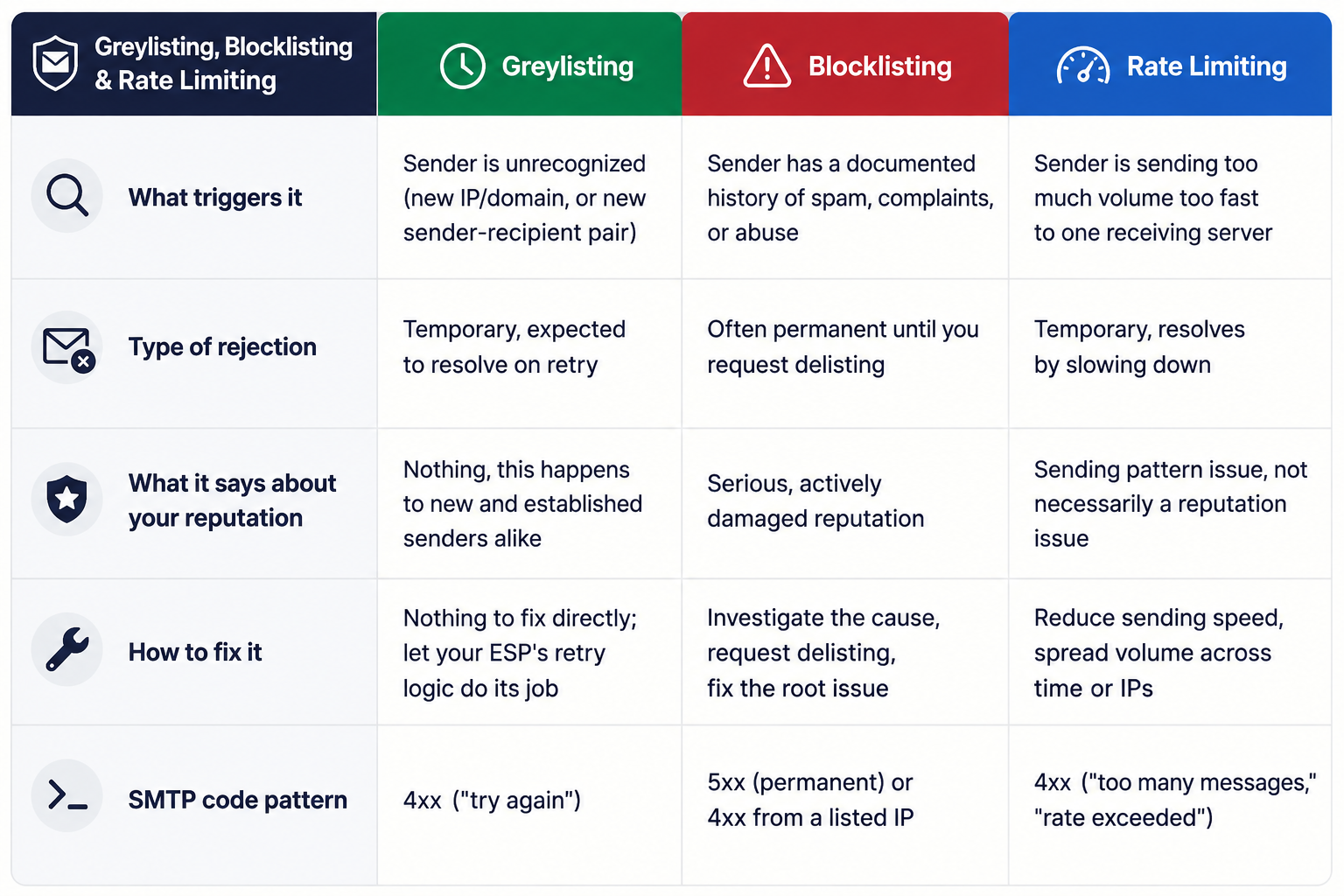
The practical difference: greylisting is a non-event for most senders with decent infrastructure. Blocklisting means something is actively wrong and needs investigating. If you're seeing consistent, unresolved bounces (not just delayed ones), it's worth checking whether you're dealing with a reputation problem rather than routine greylisting. Our guide on why emails bounce and how to reduce bounce rates breaks down the full range of causes if you're not sure which one you're looking at.
Why Greylisting Happens More Often Than You'd Think
A few situations make greylisting more likely to show up in your logs:
- New sending domains or IPs: Anything unfamiliar to a receiving server is a candidate for greylisting, which is one reason domain and IP warm-up matters for new senders.
- Shared IP pools: If your ESP rotates through a pool of IPs, the "triplet" the receiving server remembers may not match on every send, triggering repeat greylisting even for recipients you've emailed before.
- Low-volume or infrequent senders: Servers you rarely send to are more likely to treat you as unfamiliar each time.
- Corporate and government mail servers: These are more likely to run greylisting than large consumer providers like Gmail or Outlook, which mostly rely on other filtering methods at scale.
Does Greylisting Hurt Your Sender Reputation?
Not directly. Greylisting itself isn't a mark against you, it's simply how a receiving server handles an unfamiliar sender. Where it can become a problem is indirect: if greylisting delays push your open and click timing outside optimal windows, or if your sending infrastructure isn't retrying properly and messages quietly fail to redeliver, that shows up as lower engagement, which mailbox providers do weigh into their reputation signals over time.
If you're seeing a pattern of delayed or inconsistent delivery alongside declining engagement, it's worth ruling out a genuine reputation issue. Our breakdown of how long sender reputation recovery actually takes covers how to tell the difference and what to do if it turns out to be more than routine greylisting.
Can Email Verification Tools "Bypass" Greylisting?
This is worth being direct about, since it's an area where some tools overclaim. No verification tool can bypass greylisting outright, because greylisting is enforced by the receiving mail server, not the sender. What a verification process can do is work with it: when a validation attempt hits a greylist response, a well-built system recognizes the 4xx pattern, waits, and retries within the expected window rather than marking the address as invalid or unknown on the first attempt.
This matters most for list verification specifically. If a verifier gives up after a single temporary rejection, it can misreport a perfectly valid address as "unknown" or "risky," when the truth is simply that the receiving server asked it to try again. The fix isn't a workaround, it's patience built into the retry logic.
A Quick Checklist for Reducing Greylisting Friction
You can't eliminate greylisting since it's the receiving server's call, not yours, but you can reduce how often it disrupts your sending:
- Set (or confirm) sensible retry intervals on your sending infrastructure, most ESPs handle this automatically, but it's worth confirming if you're on a custom setup.
- Warm up new IPs and domains gradually rather than sending high volume from day one.
- Keep your authentication current. SPF, DKIM, and DMARC don't prevent greylisting, but a properly authenticated domain is treated more favorably across the board and reduces the odds of being mistaken for a spam source.
- Watch your bounce logs for 4xx patterns, not just overall bounce rate, so you can tell greylisting apart from a real deliverability problem early.
- Keep your list clean before you send. A verified list means the addresses that get delayed by greylisting are worth the wait, rather than mixed in with invalid or risky addresses that would fail anyway. Our guide to reducing bounce rates through list hygiene covers the full process.
FAQ
Is greylisting the same as being blocklisted?
No. Greylisting is a temporary, automatic delay applied to unfamiliar senders and it usually resolves on the next retry. Blocklisting is a documented flag against your domain or IP tied to spam or abuse history, and it typically requires action on your part to resolve.
How long does greylisting usually last?
Most greylisting delays resolve within 1 to 30 minutes on the first retry, depending on how the receiving server is configured. Some servers use longer windows, but a properly configured sending server should get through on the standard retry cycle.
Does greylisting mean my email address list has bad data?
Not on its own. Greylisting happens because of the sending server's history with a recipient's mail server, not because of the state of an individual email address. That said, if you're seeing bounces you can't explain, it's worth verifying your list to rule out invalid or risky addresses hiding in the same batch.
Can I stop my domain from being greylisted?
Not entirely, since the decision sits with the receiving server. You can reduce how often it happens by using a warmed-up, authenticated, consistent sending setup, which makes your domain look familiar and trustworthy faster.
Will greylisting show up in my email verification results?
It can, temporarily. If a verifier's retry logic isn't built to handle it, greylisted addresses may return as "unknown" rather than "valid." This is a known limitation across the industry, and it's worth understanding when interpreting your validation results.
If you're not sure whether the bounces in your last campaign are greylisting, a reputation issue, or bad list data, running your list through no2bounce before your next send is the fastest way to find out.
Start cleaning your list instantly.
No credit card required.