.jpg)
In short:
• A browser-side email check improves the userexperience, but it isn’t a control. Anyone can skip the form and send requestsstraight to your endpoint.
• A correctly formatted address isn’t necessarily a real,reachable mailbox.
• Call the verification API from your server, never frombrowser code, or you risk leaking your API token.
• Decide in advance what happens when the check is slowor fails. A service error is not proof the address is bad.
Who this isfor: developers, indie hackers and technical founders who built (or areabout to build) a signup form with an AI coding assistant and want it to beproduction-ready.
What “vibe coding” a signup form gets you
Vibe coding, aterm popularized by Andrej Karpathy in early 2025, means describing what youwant in natural language and letting an AI assistant write the code. For asignup form, that gets you a working interface in minutes: an email field, abutton, a friendly error message.
The speed isreal, and so is the gap. Independent measurements put the share of AI-generatedcode tasks with security issues at roughly 45%, with the failures mapping tocommon categories like input validation and insecure data handling. The CloudSecurity Alliance reports a similar figure, at least 45% containing dangerousvulnerabilities. Treat these as indicators, not precise measurements, sincemethods differ. The practical point is that generated code is a first draft.
For formsspecifically, reviewers note that AI-built apps commonly show missing inputvalidation, missing rate limiting and exposed API keys in client code. Otherswarn that an assistant may implement a client-side check that looks like itworks but lacks robust server-side enforcement.
You don’t haveto take that on trust. The test further down takes two minutes.
Why client-side validation isn’t a control
A browsercheck, whether it’s type="email" or a regex, runs on the visitor’smachine. It’s a convenience that catches typos. It can’t stop anyone whodoesn’t use your form.
This is all ittakes to bypass it:
curl -X POST https://yourapp.com/api/signup \
-H "Content-Type:application/json" \
-d'{"email":"not-checked@nowhere.invalid"}'
If your backendaccepts that request without checking, the front-end validation never ran. Botsdo exactly this at scale. They skip your page and hit the endpoint directly.
The rule:validate in the browser for the user, and validate again on the server for you.
A valid format isn’t a deliverable address
Even aserver-side format check only tells you the string looks like an email. Itcan’t tell you:
• whether the domain accepts mail
• whether that specific mailbox exists
• whether the address is a disposable or temporary one
• whether it sits behind a catch-all domain that acceptseverything, which hides dead mailboxes
person@example.compasses any format check. So does a typo like name@gmial.com. Each one thatgets through becomes a bounce later, a wasted welcome email, or a fake accountin your user table.
This is the jobof an email verification API. no2bounce, for example, combines SMTP validation,syntax checks, MX record verification, disposable email detection, role-basedemail identification and catch-all verification. See the email validation tooland catch-allverification for details.
The right architecture: browser, your server, then the API
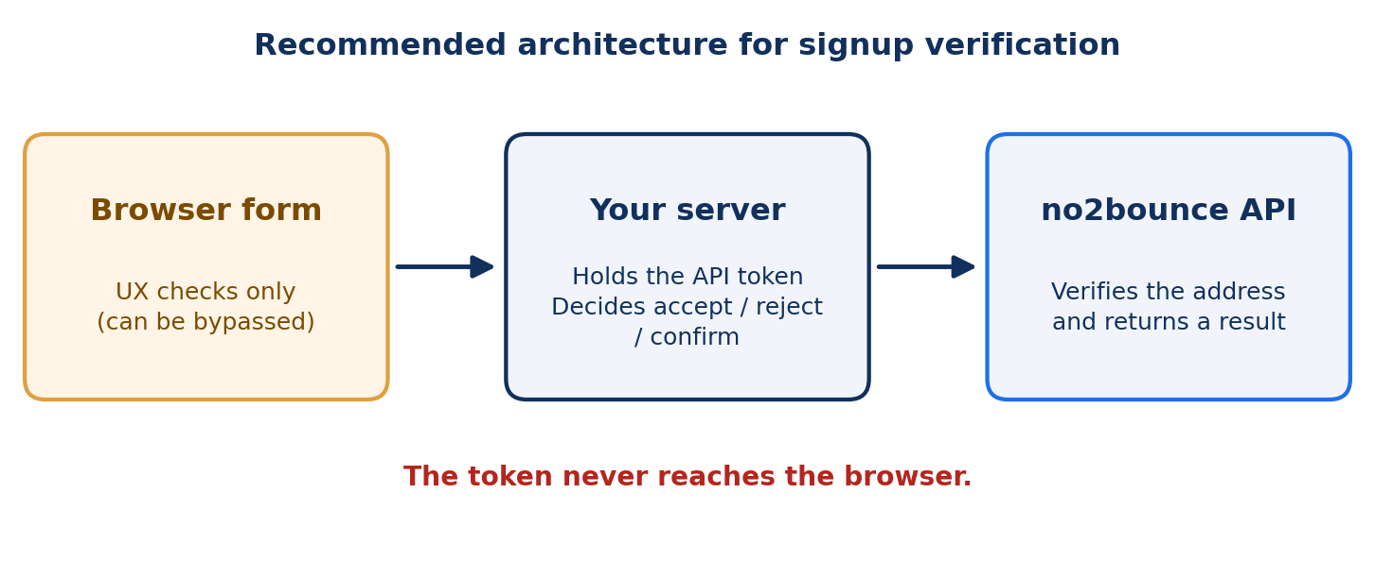
The browsernever talks to the verification API. Your server does, with the token stored asa server-side environment variable. This matters especially with AI assistants,because a generated “quick fix” can call the API straight from browserJavaScript and expose the token to anyone who opens developer tools. Guidancefrom security practitioners is consistent: API keys should never be exposed inclient-side code and should be stored securely on the server side.
Implementation: a Next.js route handler
The no2bouncedocumentation describes a submit-then-poll flow. You send a POST with anemailList array and your apitoken header, receive a trackingId, then send a GETwith that trackingId to retrieve progress and results. The sample below followsthat documented flow for a single address.
Before youship it: the code reads the per-job count fields shown in the documentation(totalEmails,completedEmails,invalid,deliverability).Run a test call on your own account and confirm the exact field names andmeanings in your response.
// app/api/verify-email/route.ts
import { NextResponse } from "next/server";
const API_URL = "https://connect.no2bounce.com/v2/n2b_validate_bulk";
const TOKEN = process.env.NO2BOUNCE_API_TOKEN; // server-only: no NEXT_PUBLIC_prefix
const TIMEOUT_MS = 6000; // total budget for the check; tune for your form
const POLL_MS = 500;
type Verdict = "accept" | "reject" | "confirm";
const sleep = (ms: number) => new Promise((r) => setTimeout(r, ms));
const FORMAT = /^[^\s@]+@[^\s@]+\.[^\s@]+$/;
async function verify(email: string): Promise<Verdict> {
if (!TOKEN) return "confirm";// misconfiguration: fail open, and log it
const headers = { apitoken: TOKEN,"Content-Type": "application/json" };
const deadline = Date.now() +TIMEOUT_MS;
try {
// 1. Submit a one-address job (POSTwith emailList returns data.trackingId)
const submit = await fetch(API_URL, {
method: "POST",
headers,
body: JSON.stringify({ emailList:[email] }),
signal:AbortSignal.timeout(TIMEOUT_MS),
});
const { data } = await submit.json();
const trackingId = data?.trackingId;
if (!trackingId) return"confirm";
// 2. Poll the results endpoint untilthe job completes or time runs out
while (Date.now() < deadline) {
const res = awaitfetch(`${API_URL}?trackingId=${trackingId}`, {
headers: { apitoken: TOKEN },
signal:AbortSignal.timeout(Math.max(deadline - Date.now(), 1)),
});
const { data: job } = awaitres.json();
if (job &&job.completedEmails >= job.totalEmails) {
// CONFIRM these field names andmeanings against a real response.
if (job.invalid > 0) return"reject";
if (job.deliverability > 0)return "accept";
return "confirm"; //catch-all or anything inconclusive
}
await sleep(POLL_MS);
}
} catch {
// Network error or timeout: this isnot proof the address is bad.
}
return "confirm"; // failopen, but require email confirmation
}
export async function POST(req: Request) {
const body = await req.json().catch(()=> null);
const email =
typeof body?.email ==="string" ? body.email.trim().toLowerCase() : "";
// Server-side format check: thebrowser's check can be bypassed.
if (!email || email.length > 254 ||!FORMAT.test(email)) {
return NextResponse.json(
{ ok: false, message: "Pleaseenter a valid email address." },
{ status: 400 }
);
}
const verdict = await verify(email);
if (verdict === "reject") {
return NextResponse.json(
{ ok: false, message: "Thataddress doesn't look deliverable. Please check it for typos." },
{ status: 422 }
);
}
// Create the account here. For"confirm", keep it provisional until the
// user clicks a confirmation link.
return NextResponse.json({ ok: true,requiresConfirmation: verdict === "confirm" });
}
Three notes onthis code:
• Rate limiting isn’t shown. Add per-IP limitsbefore this handler runs, because verification costs credits and a bot can burnthem.
• Don’t promise instant results to users. Becausethe documented flow is submit-and-poll, show a loading state and keep a hardtimeout. How long a check takes depends on the address and domain, so measureit on your own account.
• Duplicate requests. The docs describe anoptional hashkey that makes the API ignore repeat requests for a short window.Its validity is three minutes, and it was introduced mainly for large bulkjobs. Check whether it suits your single-address flow before relying on it.
What to do with each result
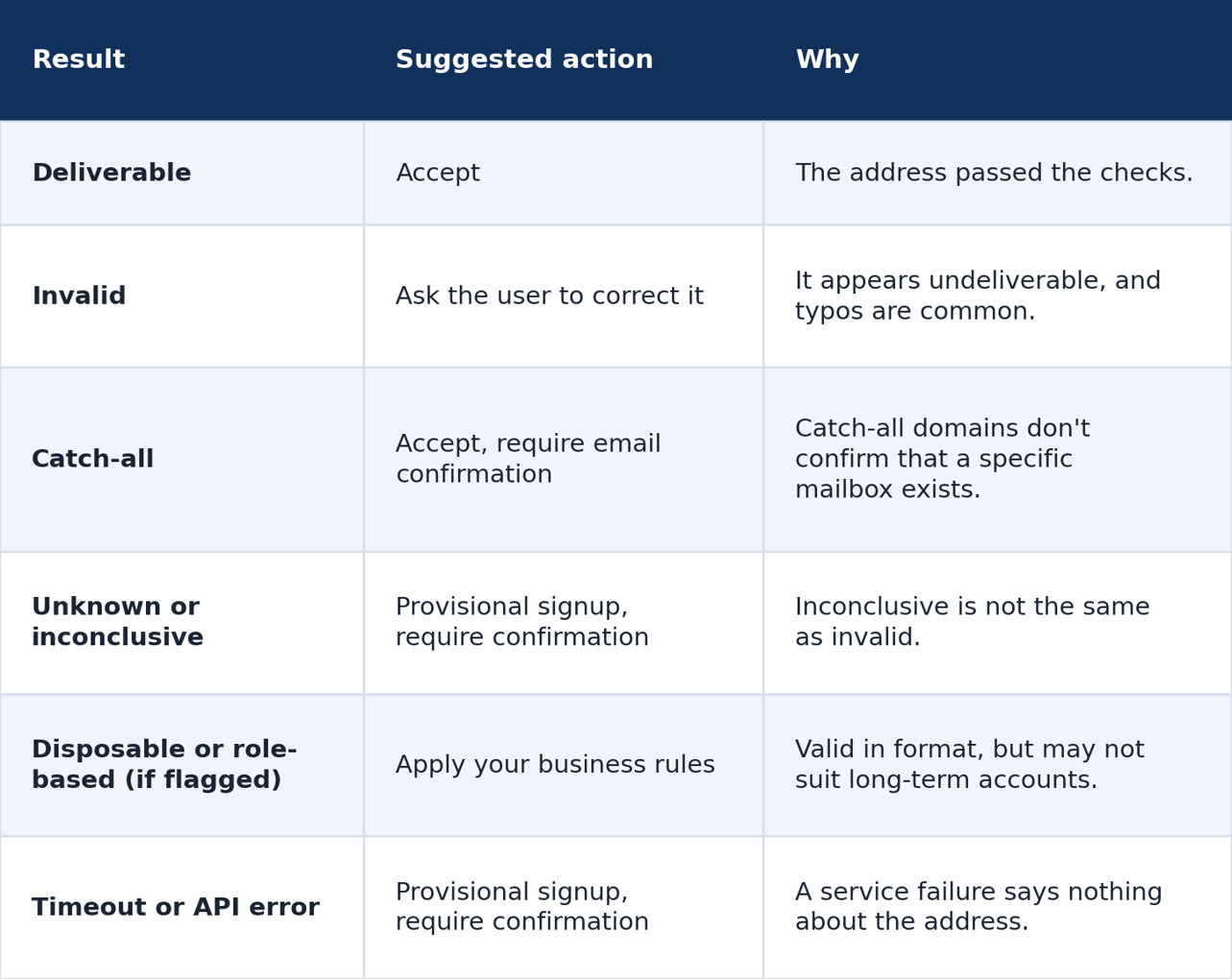
These aresuggested defaults. Adjust them to your product’s risk level, and check theexact status names your verification response returns.
Fail-open or fail-closed?
If theverification call times out, you have two choices:
• Fail-open: let the signup continue provisionallyand rely on an email confirmation link.
• Fail-closed: block signup until verificationsucceeds.
For most signupforms, fail-open with a confirmation step is the better default, because abrief outage shouldn’t stop legitimate people from joining. One rule matters: fail-openapplies to service errors only. An explicit “invalid” result should stillbe rejected.
For fintech,fraud-sensitive products or systems with strict eligibility rules, fail-closedor extra risk checks can be justified. Decide it deliberately rather thanleaving it to whatever the assistant generated.
A prompt to give your AI assistant
Don’t just askfor “an email signup form.” Ask for the security requirements by name:
Prompt: Builda signup form with a Next.js route handler. Validate email format in thebrowser and again on the server. Call the no2bounce verification API only fromthe server, using an environment variable for the token, never in client codeor NEXT_PUBLIC variables. Submit the address, then poll the results endpointusing the returned trackingId, with a hard timeout. Reject only explicitlyinvalid results. If the call times out or errors, allow a provisional signupthat requires email confirmation. Add per-IP rate limiting. Never log the APItoken. Return generic error messages.
Then reviewwhat comes back. Generated code is a draft, and the checklist below is yourreview.
Test your own form in two minutes
Run theseagainst whatever your assistant built:
1. Format-only cases. Try hello, person@example.comand an empty field. A format-only check should reject the first and last. Itwill accept the second, even though no mailbox has been confirmed.
2. The bypass test. Send a direct curlrequest (above) with an invalid address. If your backend accepts it, thefront-end check is the only protection you have.
3. The token test. Open browser developer tools,search the page source and network requests for your API token. If it appears,move the call to the server and rotate the token.
Pre-launch checklist
• ☐ Email formatis validated on the server, not only in the browser
• ☐ Theverification API is called from the server only
• ☐ The API tokenis an environment variable and appears nowhere in client code or logs
• ☐ A timeout isset, and a fallback is defined for timeouts and errors
• ☐ “Unknown” and“catch-all” results aren’t treated as “invalid”
• ☐ Rate limitingprotects the endpoint
• ☐ Emailconfirmation is required for provisional signups
• ☐ The form showsa loading state and clear, generic error messages
What verification won’t fix
• It doesn’t prove ownership. A deliverableaddress can still belong to someone else. A confirmation email proves the usercontrols it.
• It isn’t bot protection. Pair it with ratelimiting, CAPTCHA or other abuse controls.
• It doesn’t replace consent. Follow GDPR,CAN-SPAM and similar rules.
• It isn’t 100% accurate. Some mail servers blockor mask checks, which is why “unknown” results and a fallback plan exist.
FAQ
Do I still need client-side validation?
Yes, for userexperience. It catches typos instantly. Just don’t rely on it for security.
Can I call the verification API directly from the browser?
Not safely.Your token would be visible to anyone who inspects the page. Route the callthrough your server.
Should I block catch-all addresses?
Usually not.Many are real business mailboxes. Accept them with an email confirmation step.
What if the verification check is slow?
Set a timeout,show a loading state, and fall back to a provisional signup with confirmation.Don’t leave the user waiting indefinitely.
Does this replace double opt-in?
No.Verification reduces bad addresses. Confirmation proves the person owns the onethey entered.
Conclusion
AI assistantsmake a signup form easy to build and easy to ship half-protected. A browsercheck handles typos, but your server decides who gets in, and a verificationAPI tells you whether the address is worth keeping. Keep the token on theserver, plan for slow or failed checks, and confirm addresses before you trustthem.
Ready to tryit? Get 100 free verificationcredits and read the APIdocumentation.
Start cleaning your list instantly.
No credit card required.