.jpg)
An email address follows a simple structure: local part + @ symbol + domain. But knowing the structure only gets you halfway. A perfectly formatted address can still bounce, and that distinction matters if you're sending campaigns, running outreach, or maintaining any kind of contact database.
This guide covers the structure, the format rules behind it, the mistakes that break it, and why format alone isn't enough to know an email is real.
What Is an Email Address?
An email address is a unique identifier that routes messages to a specific mailbox over the internet. It has two main parts separated by the @ symbol: the local part and the domain.
Example: john.doe@example.com
"Email ID" and "email address" refer to the same thing. You'll hear "email ID" more often on forms and in customer support conversations, particularly in India and other parts of Asia, while "email address" is the more common term in the US and UK.
The Anatomy of an Email Address
1. Local Part
Everything before the @ symbol. It identifies the specific mailbox on the domain.
- Can include letters, numbers, periods, underscores, and hyphens
- Maximum length: 64 characters
- Not case-sensitive in practice, though the spec technically permits it; almost no provider enforces case sensitivity
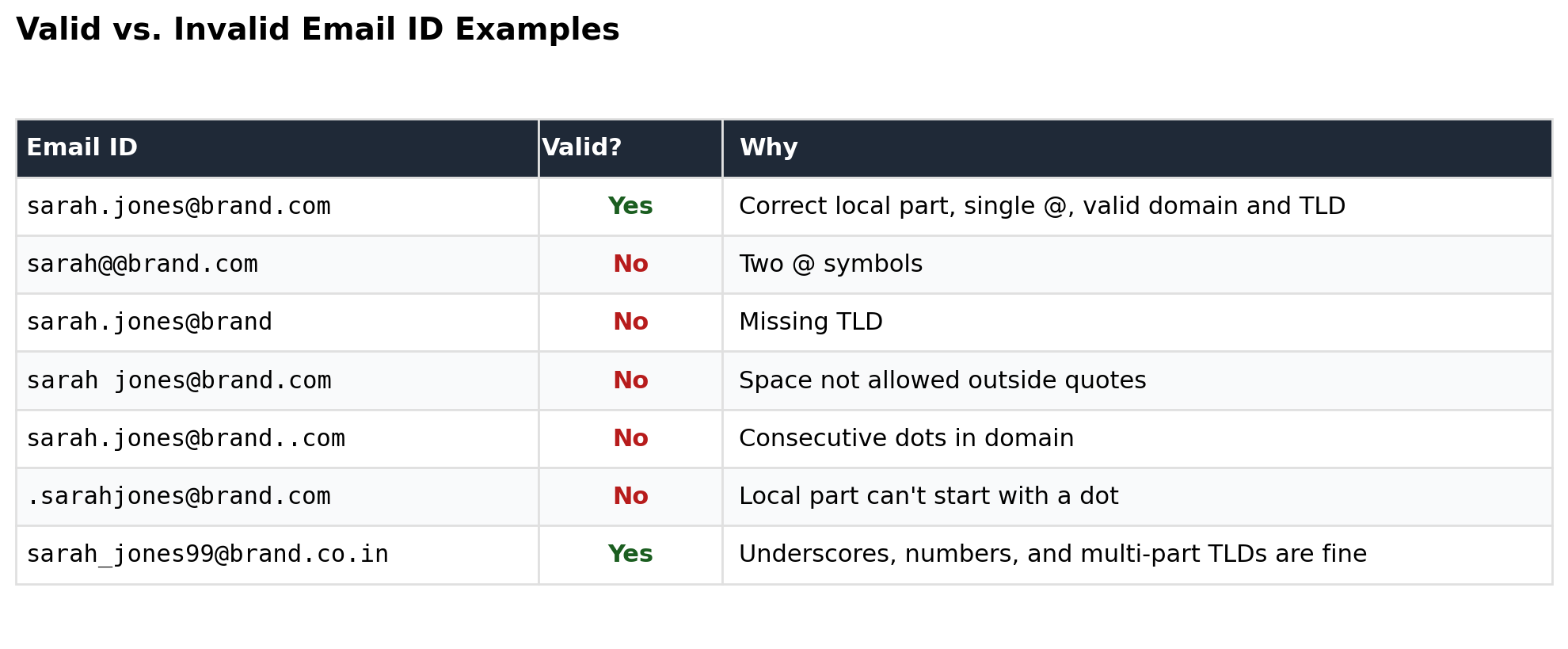
- Can't start or end with a period, and can't contain consecutive periods
Example: in john.doe@example.com, john.doe is the local part.
2. The @ Symbol
The required separator between local part and domain. There's exactly one @ in a valid address, never more, never zero. The symbol has been part of email format since 1971, when Ray Tomlinson used it to send the first networked email, borrowing the notation from its earlier use in accounting (as in "12 units @ $1 each").
3. Domain
Everything after the @. This tells mail servers which system hosts the mailbox. It has two components:
- Domain name: the organization or brand (example, gmail, outlook)
- Top-level domain (TLD): the extension after the final dot (.com, .org, .co.uk, .in)
Maximum domain length: 255 characters. Combined with the local part and @, a full address can't exceed 254 characters under RFC 5321, the technical spec that defines email transmission format. In practice, almost every real-world address is far shorter than the limit.
Why Correct Structure Isn't the Same as a Valid Email
This is the part most format guides skip, and it's the one that actually affects deliverability.
An address can follow every rule above and still bounce. Structure only confirms the address is shaped correctly. It doesn't confirm:
- The domain has active mail servers
- The mailbox actually exists on that domain
- The domain is a catch-all, silently accepting every address without confirming any of them are real
- The address belongs to a disposable or temporary email provider
- The mailbox is full, disabled, or abandoned
sarah.jones@brand.com is structurally perfect. It's also entirely possible "sarah.jones" never worked there, or the domain doesn't accept mail at all. Format and regex checks catch typos and malformed addresses. They can't catch a dead mailbox or a plausible-looking name on a real domain.
Across the lists we verify at No2Bounce, format errors are rarely the biggest source of bad data. Most invalid addresses in a real list are structurally fine but fail on mailbox existence or catch-all detection, the checks that only happen after the format check passes. That's the gap syntax validation alone leaves open.
Valid vs. Invalid Email Address Examples
Common Email Format Mistakes
- Extra spaces copied in from a spreadsheet or form
- Missing TLD, especially with manually typed addresses (name@company instead of name@company.com)
- Typos in common domains (gmial.com, yahho.com): structurally valid, practically wrong
- Trailing punctuation picked up from copy-paste, like a stray comma or period
- Duplicate @ symbols from merged or corrupted data
These are the errors that slip past a quick scan of a list with hundreds or thousands of rows, and exactly what automated format checks are built to catch before anything gets sent.
Why Correct Email Format Matters
Deliverability: Addresses in a valid format are less likely to bounce outright, though format alone doesn't guarantee inbox placement. Combining format checks with mailbox and domain verification protects your sender reputation.
Data quality: For teams running email marketing campaigns or cold outreach, a clean list starts with catching format errors, then goes further to confirm the addresses are actually live.
Professionalism and brand consistency: Standardized formats, like firstname.lastname@company.com, are easier for recipients to recognize and trust, and easier for your own team to maintain consistently across tools and systems.
Best Practices for Keeping Your List Format-Clean
- Verify at collection. Check format at the point of signup or entry, not months later when you're about to send.
- Clean on a schedule, not just once. Lists decay as roles change and inboxes get abandoned.
- Standardize your own outbound format. Pick one pattern (e.g., first.last@company.com) for company addresses and stick to it.
- Go beyond format checks. A regex or format validator catches malformed addresses; it won't tell you if the mailbox is real. Use an email verification tool for that layer.
Common Formatting Questions
Which of these is correctly formatted: john.doe@example.com or john.doe@@example.com?
john.doe@example.com is correct. The second version has two @ symbols, which makes it invalid; there's only ever one @ in a valid address.
Does capitalization matter in an email address?
The local part is technically case-sensitive per spec, but almost no email provider enforces this in practice. JaneDoe@ and janedoe@ reach the same inbox on virtually every major provider.
What's the maximum length of an email address?
64 characters for the local part, 255 for the domain, 254 total under RFC 5321.
Is "email ID" the same as "email address"?
Yes. Different regions favor different terms, but they describe the same thing.
Can an email address have a plus sign in it?
Yes, on providers that support subaddressing (Gmail and several others). jane+newsletters@gmail.com routes to the same inbox as jane@gmail.com and is often used to filter or track signups.
The Bottom Line
A correctly structured email address is a starting point, not a guarantee. Format rules catch obvious typos and malformed entries. They won't tell you whether a mailbox is real, active, or safe to send to. If you're cleaning a list before a campaign or an outreach send, run it through a verification check that goes beyond format, one that confirms the domain, the mailbox, and catch-all status.
Start cleaning your list instantly.
No credit card required.