Most list cleaning focuses on invalid addresses, the ones that bounce. But some of the addresses that damage sender reputation are not invalid at all. They exist, they accept mail, and they pass a basic mailbox check. They are still the wrong people, or the wrong kind of address, to send to.
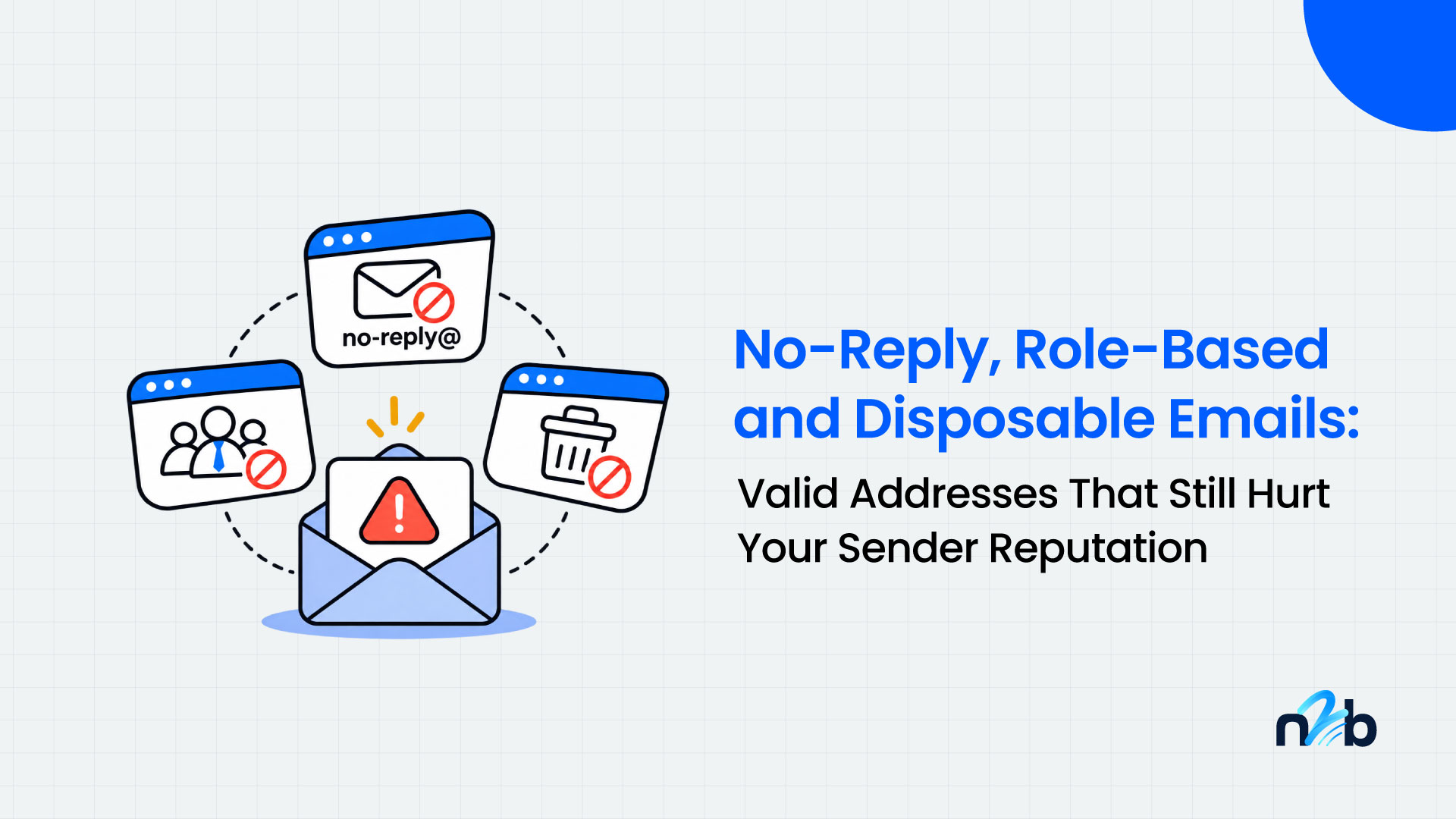
Three types do most of this damage: role-based addresses like info@ and sales@, disposable addresses from temporary inboxes, and no-reply addresses nobody reads. This guide explains how each one hurts you, how to tell them apart, and what to do with each.
In short: deliverable does not mean safe to send. These address types rarely show up in your bounce rate. They show up in spam complaints, low engagement and later bounces, so you need a handling rule for each, not just a valid or invalid filter.
Why these addresses are different from invalid ones
An invalid address fails loudly. The server rejects it, the bounce shows in your report, and you remove it. Risky address types fail quietly:
- They often pass a mailbox check, so they look clean in a valid or invalid split.
- The harm lands in other metrics: spam complaints, low engagement and delayed bounces.
- Mailbox providers watch those signals. Google's sender guidelines say to keep your spam rate in Postmaster Tools below 0.10% and avoid ever reaching 0.30%, so even a small group of addresses that complain can matter.
This is not a case of verification tools failing. Most professional verifiers flag role-based and disposable addresses. The gap is usually on the sender's side: the flag exists in the results, but nobody has decided what to do with it.
Role-based addresses
Role-based addresses belong to a function, not a person: info@, sales@, support@, admin@, contact@, billing@. Several people can read them, and nobody owns the relationship.
Why they hurt: A shared inbox means more people who can hit the spam button, and almost nobody there opted in to your emails personally. Engagement tends to be low, and some organizations filter these inboxes more strictly. Several vendors also warn that abandoned role addresses can be repurposed as spam traps, though this is mostly vendor-reported, so treat it as a risk rather than a certainty.
What to do: Suppress them from cold outreach and marketing sends by default. Keep them when the contact gave you that address on purpose, or for transactional mail such as invoices and account notices. If someone signs up with info@, ask for a personal address at the next touchpoint.
Disposable addresses
Disposable addresses come from temporary inbox services. People use them to get a download or a trial without handing over a real address. The inbox may accept mail for a short time and then disappear.
Why they hurt: An address that checked out as valid at signup can bounce days later. Even while it works, it signals a low-intent signup that will not turn into a customer, and it inflates your list size and any per-contact costs.
What to do: Block them at capture with real-time verification, and tell the visitor why. For existing lists, remove them. If your signup flow sends a confirmation email first, you still gain from blocking disposable domains, because it keeps junk out of the CRM and out of ad audiences.
No-reply addresses
No-reply addresses such as noreply@ are meant for sending, not receiving. They end up in lists through CRM imports, scraped email threads, signature blocks and form fields filled in with whatever address was handy.
Why they hurt. Nobody reads that mailbox, so engagement is zero. Depending on the setup, some reject inbound mail and some accept it silently. Either way, you add contacts that can never respond, convert or complain in a useful way.
What to do. Remove them from marketing and outreach lists. If the record is a real customer, ask for a monitored address through another channel.
Quick reference: how to handle each type
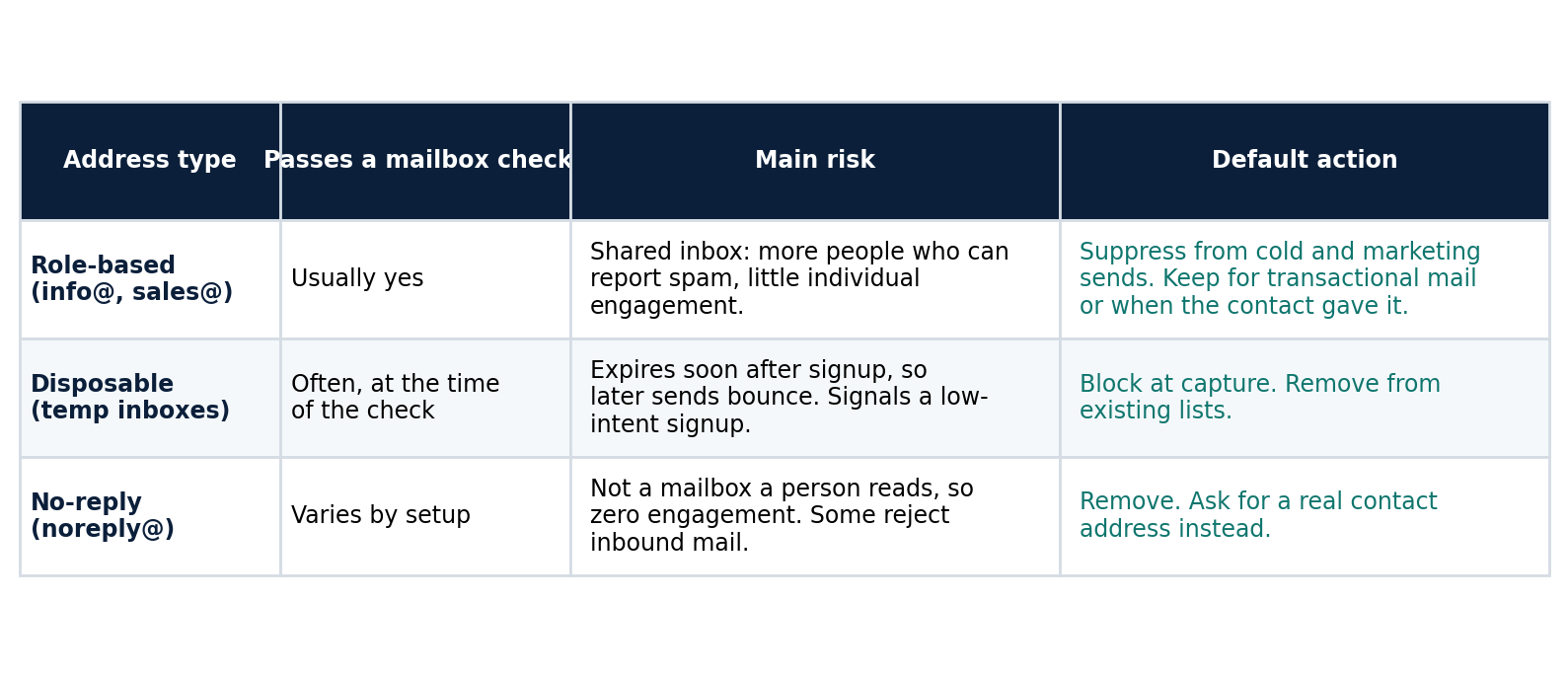
Table: role-based, disposable and no-reply addresses compared by mailbox check result, main risk and default action.
Catch-all addresses are a related category. They accept all mail at a domain, so a verifier cannot confirm a specific mailbox. They need their own handling, covered in our guide to catch-all emails (/blog/catch-all-emails).
A worked example (illustrative numbers)
These rates are made up to show how a small segment can punch above its weight. Use your own data.
- A list of 50,000 contacts has 2,000 role-based addresses (4 percent).
- The other 48,000 complain at 0.05 percent, which is 24 complaints.
- The role-based group complains at 0.4 percent, which is 8 complaints.
Your overall complaint rate is 32 ÷ 50,000, or 0.064 percent. The role-based group is 4 percent of the list but 25 percent of the complaints. Remove it and the rate drops to 0.05 percent.
Vendor pages quote different complaint multiples for role-based addresses, from two times to five times, and we found none backed by a published study. That is why measuring your own segments matters more than trusting any single benchmark.
How to build handling rules that stick
- Verify and flag. Run your list through a verifier that reports role-based, disposable and catch-all status as separate flags, not just valid or invalid. Confirm how your tool labels each one.
- Write a policy per use case. Cold outreach and marketing: suppress role-based, disposable and no-reply. Transactional and support: allow role-based when the contact supplied it.
- Block at the door. Use real-time verification on forms to reject disposable addresses and prompt for a personal or work address when someone enters a role-based one.
- Tag, do not just delete. Store the flag in your CRM so you can segment, report and avoid re-importing the same addresses.
- Measure by segment. Compare bounce rate, complaint rate and engagement for flagged and unflagged contacts, and watch your spam rate in Postmaster Tools.
- Re-check on a schedule. Role addresses get abandoned and disposable inboxes expire, so a clean list today can drift.
No2Bounce helps you identify invalid, disposable, catch-all and risky addresses through bulk verification and an API. See the verification page for the current list of flags and how each is reported.
Common mistakes
- Treating "valid" as "safe". A valid result only says the mailbox exists.
- Deleting every role address. Some are legitimate, especially in B2B and for transactional mail.
- Ignoring the flags. A verification report that nobody acts on does nothing for reputation.
- Cleaning once. New imports and new signups bring the same address types back.
- Relying on vendor benchmarks. Your own segment data is the most reliable guide.
FAQ
Are role-based email addresses bad?
Not always, but they carry more risk for marketing and cold outreach because a shared inbox has more people who can report spam and little individual engagement. They are often fine for transactional mail or when the contact gave you that address on purpose.
Do role-based emails hurt deliverability?
They can, mainly through spam complaints and low engagement rather than bounces. Google's guidance is to keep your reported spam rate below 0.10% and avoid reaching 0.30%, so a segment that complains more than the rest can push your overall rate up.
What is a disposable email address?
It is a temporary address from a service built for short-term use. It may work briefly and then expire, which causes later bounces and signals a low-intent signup.
Can I send to a no-reply address?
You can, but there is no point for marketing. Nobody monitors the mailbox, so engagement is zero and some servers reject inbound mail. Remove these from lists and ask for a monitored address instead.
Does email verification detect these address types?
Most professional email verification tools flag role-based and disposable addresses. Check how your tool reports them and whether it separates them from the valid status, then apply a handling rule to each flag.
Check your list for risky addresses
Run your list through No2Bounce to see how many addresses are invalid, disposable, catch-all or otherwise risky before your next send. Then segment by address type and compare complaint and bounce rates.
Start cleaning your list instantly.
No credit card required.