.jpg)
Email spoofing lets an attacker send a message that looks like it came from your domain, without ever breaking into your systems. The fix is not one setting. It is a combination of authentication records, an enforcement policy that actually blocks unauthorized mail, and a few habits that close the gaps those records cannot cover on their own.
Recent data shows why this matters right now. Cloudflare's email security telemetry found that about 1 in every 5.5 inbound messages in early 2026 was classified as a spoof attempt. And Valimail's 2026 State of DMARC Report found that even among domains that have published a DMARC record, only 42% have it set to actually block anything. The rest are watching spoofing happen and doing nothing to stop it.
This guide walks through exactly how to close that gap, one step at a time.
What Is Email Spoofing? (And Why It Works)
Email spoofing means forging the "From" address on a message so it appears to come from a domain the sender does not control. Unlike a hacked inbox or a phishing link that needs a click to do damage, spoofing needs nothing from you at all. The attacker never touches your servers, your accounts, or your password. They simply write your domain into the sender field and hit send.
This works because the core email protocol, SMTP, was built decades ago with no built in way to verify who is actually sending a message. Anyone can type any "From" address into an email client. Without additional protection, the receiving server has no way to confirm whether that claim is true.
That is exactly why authentication protocols exist, and exactly why so many domains are still exposed. More than half of all domains with a published DMARC record are sitting at a monitoring only setting that collects data on spoofing attempts but never actually blocks them. If your domain falls into that group, attackers can impersonate you today, and you would have no idea unless you went looking for it.
How Attackers Spoof Your Domain (3 Common Techniques)
Not all spoofing looks the same. Knowing the difference helps you understand which defenses actually matter for your situation.
Display Name Spoofing
This is the simplest and most common version. The attacker sets their display name to something like "Your Company Support," while the actual email address underneath is completely unrelated. Most people on a phone never see the real address, only the display name, which is exactly what makes this so effective and so hard to catch without training.
Lookalike Domain Spoofing
Here the attacker registers a domain that looks almost identical to yours, swapping a letter, adding a hyphen, or using a different extension. An email from "yourcompanny.com" or "your company.net" can pass right through authentication checks, because technically it is not spoofing your real domain at all. It is impersonating it from a domain the attacker legitimately owns.
Direct Domain Spoofing
This is the most serious version, and the one authentication protocols are specifically built to stop. The attacker sends mail that claims to come directly from your real domain. If you have no SPF, DKIM, or DMARC protection in place, or if your DMARC policy is not actually enforcing anything, there is nothing technically stopping that message from reaching an inbox looking completely legitimate.
Step 1: Set Up SPF to Authorize Your Senders
SPF, or Sender Policy Framework, is a DNS record that lists exactly which mail servers are allowed to send email for your domain. When a message arrives, the receiving server checks the sending IP address against your SPF record. If it is not on the list, that is a red flag.
A basic SPF record looks something like this in your DNS settings:
v=spf1 include:_spf.yourprovider.com ~all
This tells receiving servers to trust mail coming through your provider's listed servers, and to treat anything else with suspicion.
SPF's biggest limitation is that it only checks the technical sending server, not the visible "From" address a person actually sees in their inbox. An attacker can still pass SPF while spoofing the display name a recipient reads. That is exactly why SPF alone is never enough on its own.
Step 2: Add DKIM to Sign and Protect Your Emails
DKIM, or DomainKeys Identified Mail, adds a digital signature to every email you send, generated using a private key tied to your domain. The receiving server checks that signature against a public key published in your DNS. If the message was altered in any way during transit, or if it was never actually signed by your domain, the check fails.
Setting up DKIM means generating a key pair through your email provider and publishing the public half as a DNS record. Most major providers walk you through this in a few clicks.
DKIM closes a gap SPF cannot touch: message tampering and content integrity. But like SPF, it works quietly in the background and does nothing to actually block a failed message from landing in an inbox. That decision belongs to the next protocol.
Step 3: Enforce DMARC (Don't Stop at Monitoring)
DMARC, or Domain based Message Authentication, Reporting, and Conformance, is what ties SPF and DKIM together and actually decides what happens when a message fails either check. This is the protocol that turns authentication from a passive record into active protection, but only if it is configured correctly.
DMARC policies come in three levels:
- p=none. Monitor only. Failed messages are still delivered. You get reports, but nothing is blocked.
- p=quarantine. Failed messages get sent to spam instead of the inbox.
- p=reject. Failed messages are blocked outright and never reach the recipient at all.
Here is the problem industry data keeps confirming year after year. A huge share of domains stop at p=none and never move further. Valimail's most recent report found that a full quarter of domains with DMARC have it published without any real enforcement behind it, technically compliant, but still fully exposed. If your domain is one of them, you are collecting evidence of spoofing attempts and doing nothing to stop them.
The safe path from none to reject is well documented and does not require guessing. Publish your record at p=none first and let it run for two to four weeks while you review the aggregate reports it generates. Confirm every legitimate sender, your email platform, your CRM, your support tool, shows up correctly authenticated. Then move to p=quarantine, watch for a week or two to make sure real mail still gets through, and finally move to p=reject. Skipping straight to reject without that review period is the single most common reason teams break their own legitimate mail and panic.
Step 4: Lock Down Lookalike Domains
Authentication protocols protect your real domain. They do nothing to stop someone from registering a domain that merely looks like yours. This is where a lot of brand impersonation actually happens, and it requires a different kind of defense.
Start by registering the most obvious typo variations of your own domain, the ones with a swapped letter, a missing letter, or a different extension. It is a small upfront cost compared to the damage a convincing lookalike domain can do to customer trust.
Beyond that, monitoring services exist specifically to alert you when a domain similar to yours gets registered. For most small and mid sized companies, checking a few times a year is reasonable. For larger brands, especially ones frequently targeted by phishing campaigns, continuous monitoring is worth the investment.
Step 5: Monitor Reports and Blacklists on an Ongoing Basis
Setting up SPF, DKIM, and DMARC is not a one time task you finish and forget. Your DMARC aggregate reports keep arriving, usually daily, showing you every server that sent mail using your domain and whether it passed or failed authentication.
Review these reports regularly, especially right after any change to your email setup, a new marketing tool, a new CRM integration, a new outreach platform. A sudden spike in failed messages either means a legitimate new sender needs to be added to your SPF record, or it means someone is actively trying to spoof your domain right now.
It's worth checking major email blacklists periodically using a reliable email validation tool. Getting blacklisted, even by mistake, can significantly impact your email deliverability. The sooner you identify an issue, the faster you can take action and get delisted before it affects your campaigns.
Step 6: Train Your Team to Spot What Slips Through
No protocol catches everything, especially display name spoofing, which technically passes every authentication check while still fooling a person glancing at their phone. This is where your team becomes the last line of defense.
A few habits make a real difference. Teach people to check the actual email address behind a display name before acting on anything urgent or financial. Watch for a reply to an address that quietly differs from the sender address shown. Be suspicious of any message creating pressure to act immediately, especially around wire transfers, gift cards, or login credentials. These red flags show up in nearly every successful spoofing attack, technical defenses included.
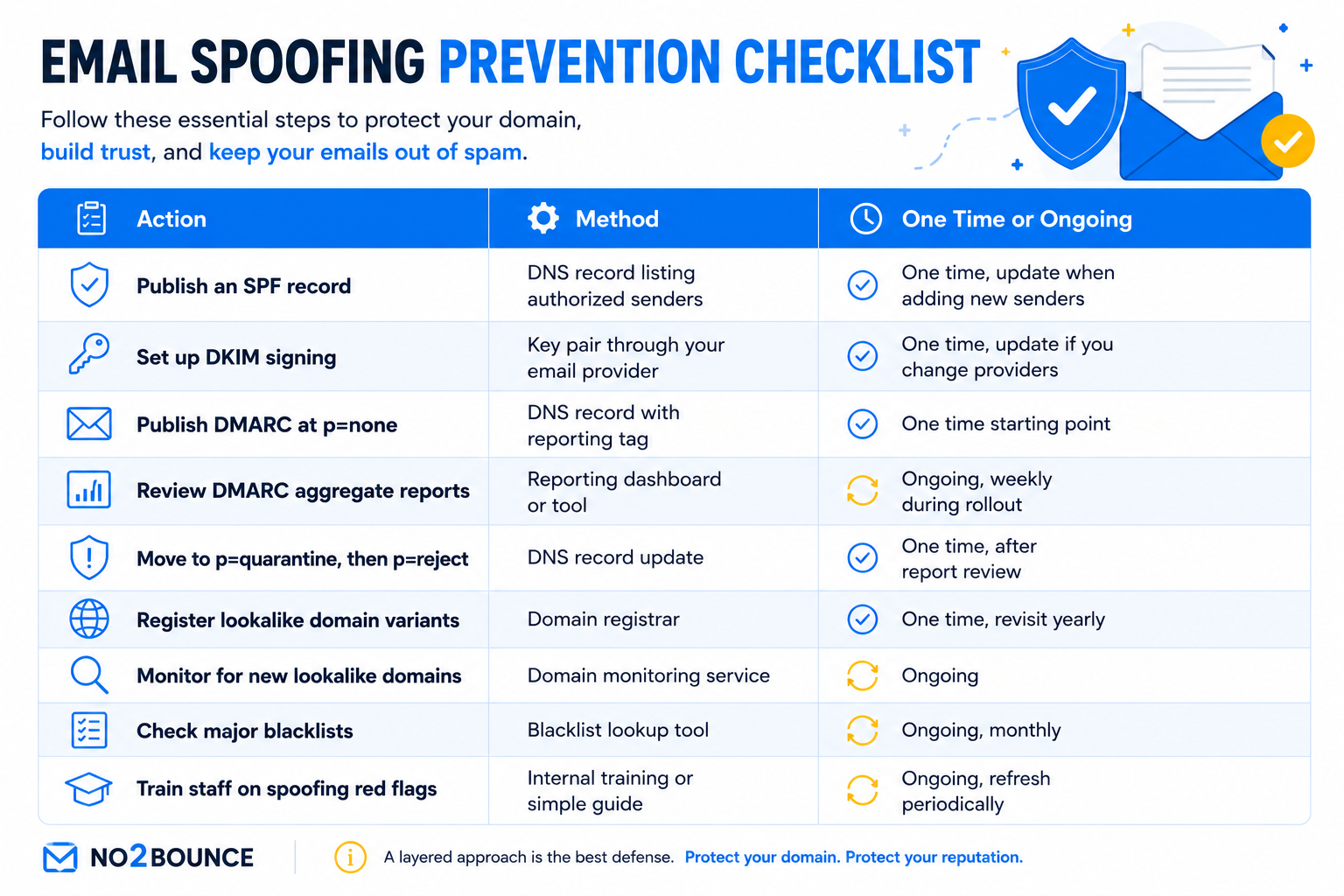
Quick Reference: Email Spoofing Protection Checklist
Use this as a working list to track where your domain actually stands.
Spoofing Protection Breaks Down If Your Sending Practices Are Messy
Here is something that rarely gets mentioned alongside spoofing advice. You can have flawless SPF, DKIM, and DMARC enforcement and still damage the exact sender reputation those protocols are trying to protect, simply by sending to a dirty list.
High bounce rates and spam complaints send the same warning signals to mailbox providers that failed authentication does. Gmail and Outlook track both signals together when deciding how much to trust your domain. A domain with perfect authentication but a 10% bounce rate still looks unreliable to a mailbox provider, and that erodes the same reputation you just spent six steps locking down.
This is the part most spoofing guides skip entirely. Clean sending habits and strong authentication work together, not separately. If your list is full of invalid, outdated, or fake addresses, every bounce chips away at the trust your DMARC enforcement is supposed to build.
Before you scale your sending volume, verify your list with No2Bounce to keep bounce rates low and protect the sender reputation your authentication setup depends on.
Final Thoughts
Email spoofing protection is not one setting you flip and forget. It is authentication first, SPF and DKIM working together, followed by a DMARC policy you actually enforce instead of leaving it at the monitor only. Add in lookalike domain monitoring, regular report reviews, and a team that knows the red flags technology alone cannot catch.
None of it holds up, though, if your sending habits undercut the reputation you are trying to protect. Keep your list clean, keep your reports reviewed, and treat all of it as ongoing work rather than a project you finish once and walk away from.
Frequently Asked Questions
What is the difference between email spoofing and phishing?
Spoofing is the technique, forging a sender address to look legitimate. Phishing is the broader attack, usually using a spoofed sender address to trick someone into clicking a link, entering credentials, or sending money. Most phishing emails rely on spoofing to look convincing.
Can SPF alone stop email spoofing?
No. SPF only checks the technical sending server, not the visible "From" address most people actually see. An email can pass SPF while still spoofing your brand through display name tricks. You need DKIM and an enforced DMARC policy alongside it for real protection.
How do I know if my domain is being spoofed?
Your DMARC aggregate reports will show you. They list every server sending mail using your domain and whether each message passed or failed authentication. A spike in failed messages from unfamiliar sources is a strong sign someone is attempting to spoof you.
Does DMARC completely stop spoofing?
Only if it is enforced. A DMARC record set to p=none provides visibility but blocks nothing. Moving to p=quarantine or p=reject is what actually stops spoofed mail from reaching an inbox. Many domains publish DMARC but never take this final step.
How long does it take to fully protect a domain from spoofing?
Setting up SPF and DKIM usually takes a day or two. The safe path through DMARC, from monitoring to full enforcement, takes about four to six weeks if you review your reports properly along the way. Rushing straight to reject without that review period risks blocking your own legitimate mail.
Start cleaning your list instantly.
No credit card required.