.jpg)
Fake email verification is the process of checking whether an email address is real, active, and capable of receiving mail, instead of being a made-up, disposable, or mistyped address. It works by checking the address against a series of technical tests: syntax, domain validity, mailbox existence, and known disposable-email databases. If you collect emails through sign-up forms, lead magnets, or checkout pages, some percentage of those addresses are fake, and verifying them before you send is the only reliable way to catch them.
This guide breaks down exactly how fake email verification works, the signs that give away a fake address, and a simple framework you can use to catch bad data before it damages your sender reputation.
Why Fake Emails End Up in Your List
People submit fake email addresses for a handful of predictable reasons, and recognizing the motive helps explain why detection has to go beyond a simple "does this look like an email" check.
- Avoiding spam: Someone wants your lead magnet or discount code but doesn't want a newsletter for life.
- Gaming free trials: A fake or temporary address lets a user re-register for a free trial after the first one expires.
- Bot and scraper traffic: Automated form fills generate random strings that pass basic syntax checks but go nowhere.
- Honest typos: "gmial.com" instead of "gmail.com" isn't malicious, but it's still undeliverable.
- Privacy protection: Some users deliberately use a disposable inbox (Mailinator, Guerrilla Mail, YOPmail) to keep their real inbox clean.
Each of these produces a different kind of fake address, which is why a single check, like confirming the format looks right, isn't enough.
The 5-Layer Fake Email Detection Framework
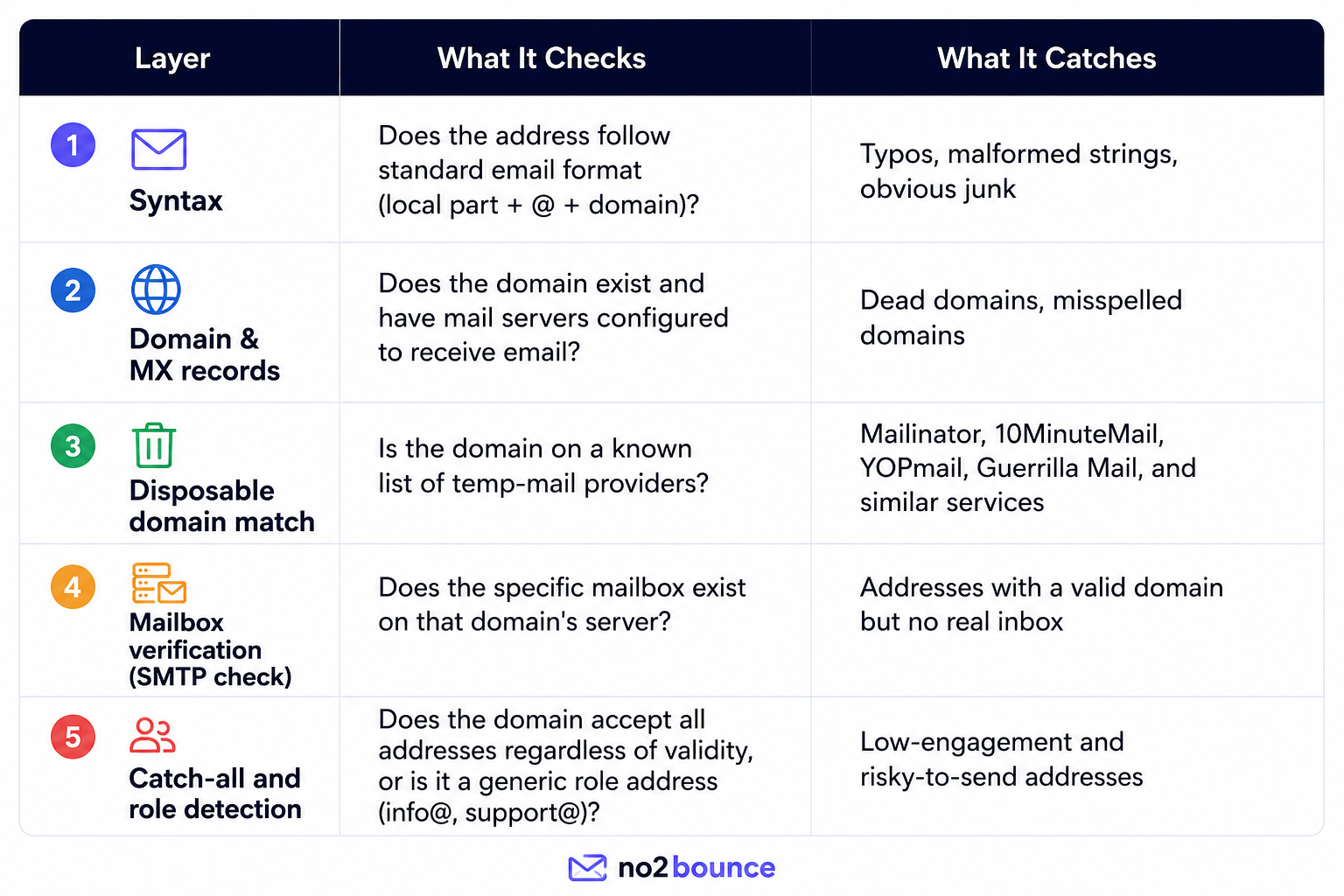
Most email verification tool, including manual checks, run an address through five layers. Each layer filters out a different category of fake or undeliverable email, and an address has to pass all five to be considered safe to send to.
Layer 1: Syntax Check
This is the fastest and least reliable layer on its own. An address can be perfectly formatted, such as asdkjh283@gmail.com, and still be completely fake. Syntax checking only confirms the address could exist, not that it does.
Layer 2: Domain and MX Record Lookup
This step queries the domain's DNS records for an MX (Mail Exchange) entry, which tells you whether that domain is even configured to receive email. If there's no MX record, no email sent to that domain will ever arrive, regardless of how real the address looks.
Layer 3: Disposable Domain Matching
This is the layer most directly tied to "fake" email verification specifically. Disposable email providers exist precisely to give people a working but throwaway inbox. A verification tool checks the domain against a continuously updated list of known disposable providers. This list needs regular updates, since new disposable domains appear constantly.
Layer 4: SMTP Mailbox Verification
This is the most technically involved layer. The verification tool connects to the domain's mail server and effectively asks, "does this specific mailbox exist?" without actually sending an email. It's the difference between confirming a street address exists and confirming someone actually lives at that house number.
Layer 5: Catch-All and Role Account Detection
Some domains are configured to accept mail sent to any address at that domain, even nonexistent ones; these are called catch-all domains. A verification tool can detect this configuration, which flags the address as "risky" rather than a clean pass or fail, since the SMTP check alone can't confirm a real person is reading it.
Signs an Email Address Is Likely Fake
If you're scanning a list manually, before running it through a verification tool, these patterns are common giveaways:
- Random alphanumeric strings in the local part (e.g., xj4k9z2@domain.com)
- Known disposable domains, such as mailinator.com, guerrillamail.com, 10minutemail.com, yopmail.com, tempmail.org, and dozens of variants
- Mismatched names, such as a form submission for "Sarah Johnson" using an email like bob1990@
- Repeated or sequential submissions from the same IP using slightly different addresses
- Free domains tied to bulk sign-up patterns: not inherently fake, but worth flagging when paired with other red flags above
None of these signs is conclusive on its own. Plenty of legitimate users have email addresses that look unusual. That's why automated, multi-layer verification consistently outperforms manual pattern-spotting.
How to Verify Fake Emails: Step by Step
Before you send anything to a new list, run it through this process:
- Run a bulk verification pass on your entire list using a fake email verification tool rather than checking addresses one at a time.
- Segment results by status: most tools return categories like Valid, Invalid, Risky (catch-all), and Disposable.
- Remove invalid and disposable addresses entirely; these will bounce or were never meant to receive mail.
- Quarantine risky/catch-all addresses for a separate, lower-volume send rather than your main campaign.
- Re-verify at the point of capture, not just before sending. Checking emails in real time at signup stops fake addresses from ever entering your database.
- Re-check older lists periodically: emails decay at roughly 2 to 3% per month as people change jobs or abandon addresses.
Real-Time vs. Bulk Verification
These two approaches solve different problems, and most teams need both.
- Real-time (point-of-capture) verification checks an address the moment someone submits a form, using an API call that returns a result in under a second. This stops fake and disposable addresses from ever being stored, which is the highest-leverage place to catch them.
- Bulk (list-cleaning) verification processes an existing list of stored addresses. It's useful for cleaning a database that's accumulated bad data over months or years, or before a major campaign send.
A real-time check at signup combined with a periodic bulk re-verification covers both new and aging data.
Why Skipping Verification Costs More Than It Saves
Sending to unverified lists creates compounding problems:
- Bounce rate damage: Mailbox providers like Gmail and Yahoo flag senders with bounce rates above roughly 0.3% under their 2024 bulk-sender guidelines, which pushes future sends, even to real subscribers, into spam folders.
- Wasted spend: Most email platforms charge per contact or per send. Fake addresses cost money without ever generating a reply, click, or sale.
- Distorted analytics: Open rates, click-through rates, and conversion metrics all get skewed by addresses that were never going to engage in the first place, making it harder to judge what's actually working.
- Spam trap risk: Some disposable and abandoned addresses get recycled into spam traps by mailbox providers. Hitting one can damage your domain reputation for months.
Frequently Asked Questions
Is fake email verification the same as email validation?
They're closely related but not identical. Validation typically refers to format and syntax checks (does it look like a real email?), while fake email verification specifically targets disposable, throwaway, and non-existent addresses through domain and mailbox-level checks.
Can a fake email pass syntax and domain checks?
Yes. An address can have a valid format and a real, working domain, like a disposable email provider's domain, and still be a fake address never intended for long-term use. This is exactly why disposable domain matching and mailbox-level checks exist as separate layers.
How accurate is automated fake email verification?
Multi-layer verification that includes SMTP mailbox checks and disposable domain matching is highly accurate for catching clearly fake or disposable addresses. Catch-all domains remain a known limitation, since the SMTP handshake can't always confirm an individual mailbox is monitored. These are typically flagged as "risky" rather than definitively fake.
Does verifying emails violate user privacy?
No. Standard email verification checks DNS records and pings the mail server without ever sending an actual email or accessing inbox content. No message is delivered, and no personal data beyond the address itself is processed.
How often should I re-verify my email list?
For active marketing lists, a quarterly bulk re-verification is a reasonable baseline, since email addresses decay over time. Lists that haven't been emailed in 6+ months should always be re-verified before any new campaign.
Start cleaning your list instantly.
No credit card required.