.jpg)
In short:
- Invalid, fake and risky emails don’t just bounce. They distort conversion data, hide your true cost per lead and weaken the audiences you build for paid campaigns.
- Judging channels by cost per reachable lead instead of cost per lead can change which channel looks best.
- Verify emails at three points: when they’re captured, before you send, and before you upload audiences to ad platforms.
Who this is for: marketers, growth teams, RevOps and demand-gen managers who run paid acquisition and email from the same contact database.
Why email list ROI is usually overstated
Most teams calculate email ROI like this:
Email ROI = (Revenue attributed to email − Cost of email program) ÷ Cost of email program
The formula is fine. The inputs are the problem. If a meaningful share of your list is invalid, fake, disposable or unreachable:
- Costs are hidden. You pay for ESP tiers, CRM storage, lead-gen ad spend and sales follow-up on contacts who can never convert.
- Attribution gets noisy. Junk records create duplicate profiles, broken identity matches and phantom engagement.
- Sender reputation drops, which hurts inbox placement for your good contacts too.
Clean data doesn’t only improve deliverability. It makes the numbers in your reports more honest.
How dirty email data corrupts attribution
1. Fake and disposable signups inflate the top of the funnel
Bots, typos and throwaway addresses all count as leads in your ad platform, CRM and dashboards. Top-of-funnel conversion rates look better than reality, and later stages (MQL to SQL to customer) look worse. Teams then optimize against a distorted funnel.
2. Automated activity pollutes engagement signals
Corporate security gateways often scan links before a human sees them, which can register as clicks. Apple Mail Privacy Protection, introduced in 2021, can register opens for emails that were never read. Any lead scoring or attribution model built on opens and clicks inherits that noise, and risky or invalid addresses add more of it.
3. Duplicates and malformed addresses break identity resolution
Email is often the join key between your CRM, ESP, ad platforms and analytics. Typos like gmial.com, alias variants and duplicates split one person into several records, so multi-touch attribution credits the wrong touchpoints or none at all.
4. Catch-all domains hide the truth
A catch-all domain accepts mail for any address, real or not, so a standard SMTP check can’t tell a live inbox from a dead one. According to no2bounce, up to a third of B2B lists sit behind catch-all domains. Many verifiers label those addresses “risky” or “unknown”, which forces a bad choice: discard them and lose real leads, or keep them all and keep the fake ones. Resolving them properly, as no2bounce’s catch-all verifier does with controlled test sends, removes that guesswork.
How dirty data wastes ad spend
- Customer Match and custom audiences. Ad platforms match your uploaded emails to user accounts. Invalid or outdated emails lower match rates, so you pay to reach a smaller audience than you assumed.
- Lookalike audiences. If the seed list contains fake or low-quality contacts, the model learns from noise.
- Lead-generation campaigns. You pay per lead, fake ones included. Your reported cost per lead understates your real cost per reachable lead.
- Retargeting and suppression. Lists built from bad records waste impressions and let the wrong people through.
A worked example (hypothetical numbers)
The figures below are made up to show the math. They are not customer results.
Two paid channels each generate 1,000 leads:
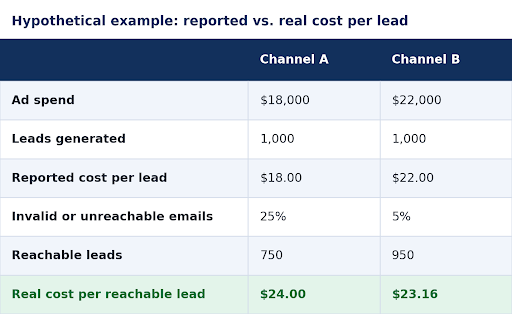
On the dashboard, Channel A looks 18% cheaper. After cleaning, Channel B is the better buy. A team that moves budget toward Channel A based on raw cost per lead pays more for every usable contact.
The check costs very little by comparison. On no2bounce’s 250,000-credit monthly plan, the pricing page lists about $0.001 per credit at the time of writing, so verifying 1,000 leads costs roughly a dollar. Pricing varies by plan.
Run your own 5-minute audit (free)
You don’t need a big project to see how this applies to you:
- Pull a random sample of about 50 recent leads from each paid channel or lead source.
- Verify them. You get 100 free verification credits with no card, enough to test two sources.
- Record the valid percentage for each source.
- Calculate the real cost per reachable lead:
Ad spend ÷ (Leads × Valid rate)
- Compare it with your reported cost per lead. A large gap means the source is bringing in bad data. A small sample gives directional results, not a precise measurement, so treat it as a prompt to investigate.
The deliverability tax on ROI
Inbox providers reward clean senders and penalize careless ones. Since February 2024, Google and Yahoo have required bulk senders (those sending 5,000+ emails a day) to deploy SPF, DKIM and DMARC and to enable easy unsubscription. They also expect spam complaint rates below 0.10%, and never reaching 0.30% or higher. Hard bounces and spam-trap hits are strong signs of poor list hygiene, and complaints tend to rise when you email addresses that never opted in or stopped engaging long ago.
If reputation falls, your best contacts land in spam too. Email-attributed revenue then drops for reasons that have nothing to do with your creative or offer. Monitor it with email scoring and a deliverability check, and use Google Postmaster Tools for Gmail.
A 5-step clean-data workflow
Step 1: Verify at the point of capture. Add real-time checks to signup and lead forms through the verification API. Catch typos and disposable domains before they enter your CRM.
Step 2: Bulk-clean your existing database. Run current lists through bulk verification and segment by status: valid, invalid, catch-all and risky. Our guide to email list cleaning covers what to do with each.
Step 3: Verify before you upload audiences. Clean any list before sending it to Google, Meta or LinkedIn as a custom or lookalike audience.
Step 4: Report on reachable leads, not raw leads. Add a “verified valid” field or lifecycle stage in your CRM. Calculate cost per lead, CAC and conversion rates on verified contacts, and compare channels on that basis.
Step 5: Automate and re-verify. Email data decays as people change jobs and companies change domains. Connect verification to your stack through integrations like HubSpot, Clay or Zapier. As a practical rule, re-verify before every large campaign, and at least every quarter for lists you email regularly. Re-check anything older than six months before a big send, especially B2B contacts.
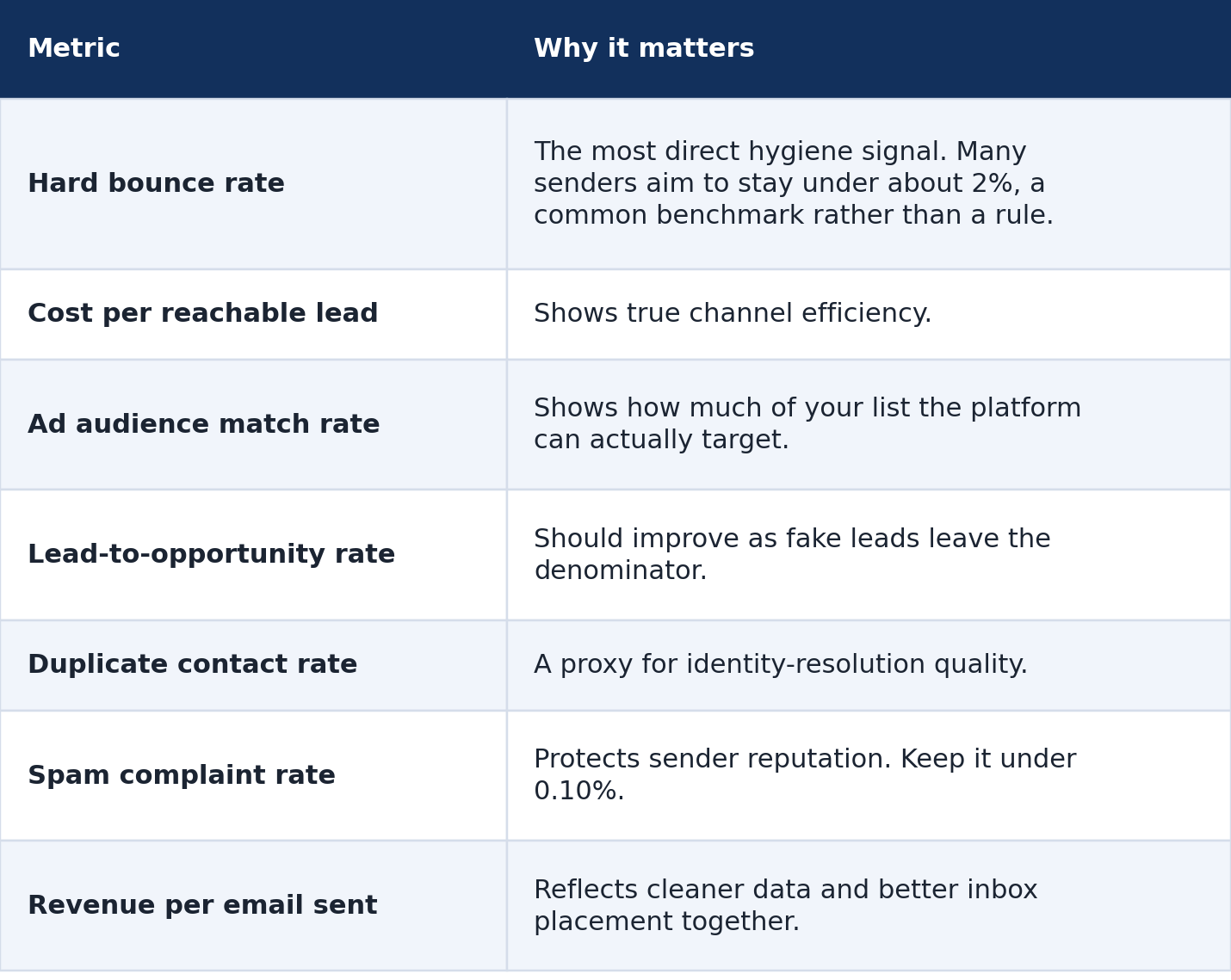
Metrics to track before and after cleaning
What clean data won’t fix
- Verification doesn’t replace consent. Email only people who opted in, and follow GDPR, CAN-SPAM and similar rules.
- No verifier is 100% accurate. Mail servers can change behavior or block checks, so verification greatly reduces risk but can’t guarantee zero bounces.
- Weak targeting and weak content still fail on a clean list.
- Attribution has other gaps, such as cross-device tracking and privacy restrictions. Clean email data fixes one important input, not all of them.
FAQ
How often should I clean my email list?
Verify at capture, before every large campaign, and at least quarterly for active lists.
Should I delete catch-all emails?
Not automatically. Many are real business contacts. Resolve them with a method that tests the mailbox instead of treating them all as risky.
Will cleaning my list improve ad performance?
It improves the quality of the audiences and lead data you feed into ad platforms, which usually improves match rates and reporting accuracy. Results vary, so compare metrics before and after.
How does the cost of verification compare with ad waste?
Verification typically costs a fraction of a cent per address, far below the cost of acquiring a lead. See pricing for current rates.
Conclusion
Clean email data makes your reporting more honest. You can compare channels on the leads you can actually reach, build stronger audiences and protect the sender reputation your email revenue depends on.
Start small: verify a sample with 100 free credits and see what share of your leads are reachable.
Start cleaning your list instantly.
No credit card required.