.jpg)
Whether you're setting up a company directory, launching an email marketing campaign, or simply organising contacts for outreach, an email ID list is your starting point. Yet many people are unclear about what it actually means, how to format one properly, or how to build a list that genuinely works.
This complete guide covers everything: what an email ID is, the different types of lists, professional format examples, and step-by-step methods to build and manage your own list for free.
What Is an Email ID?
An email ID and an email address mean the same thing. The term "email ID" is more commonly used in forms, apps, and customer support contexts (especially across South Asia), but functionally there is no difference.
Every email ID has three core parts:
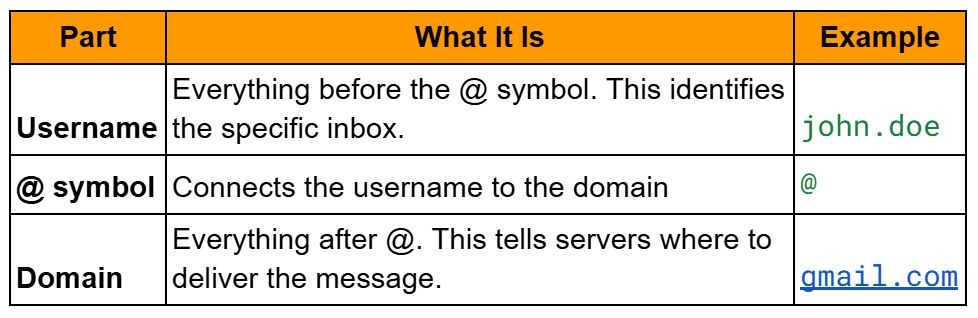
A complete email ID looks like this: john.doe@gmail.com
Email IDs are used for personal communication, business correspondence, online account registration, subscriptions, shopping receipts, and much more.
What Is an Email ID List?
An email ID list is an organized database of email addresses collected for specific purposes, including email marketing campaigns, newsletter distribution, team communication, bulk email cleaning, customer engagement, and business outreach.
Think of it as your digital contact book, focused specifically on email addresses rather than phone numbers or physical addresses.
In a business context, an email ID list is the backbone of email marketing. It lets you communicate directly with people who have expressed interest in your brand, product, or content, without relying on algorithms or paid ads.
Simple definition: An email ID list is a structured database of email addresses, often paired with names and other details, used to send targeted messages to a group of people.
Types of Email ID Lists
Not all email ID lists serve the same purpose. Here are the four main types:
1. Prospect Lists
These contain email addresses of potential customers who have shown some interest in your business but haven't yet made a purchase or taken a key action. They're typically built through website opt-in forms, social media campaigns, webinar sign-ups, or lead generation tools.
Best used for: Cold outreach, nurturing sequences, awareness campaigns.
2. Customer Lists
These are lists of existing buyers, people who have already purchased from you at least once. Because they already trust your brand, they respond well to upsell offers, cross-sells, loyalty rewards, and re-engagement campaigns.
Best used for: Retention emails, product recommendations, VIP offers.
3. Newsletter / Subscriber Lists
These are people who have voluntarily opted in to receive regular content from you, such as updates, articles, tips, or company news. They may not be ready to buy yet, but they're engaged with your brand.
Best used for: Content marketing, brand building, community nurturing.
4. Internal / Employee Lists
Used within organisations to manage team communication. These are directory-style lists of company email IDs, often structured by department or location.
Best used for: Internal announcements, HR communications, team directories.
Professional Email ID Formats & Examples
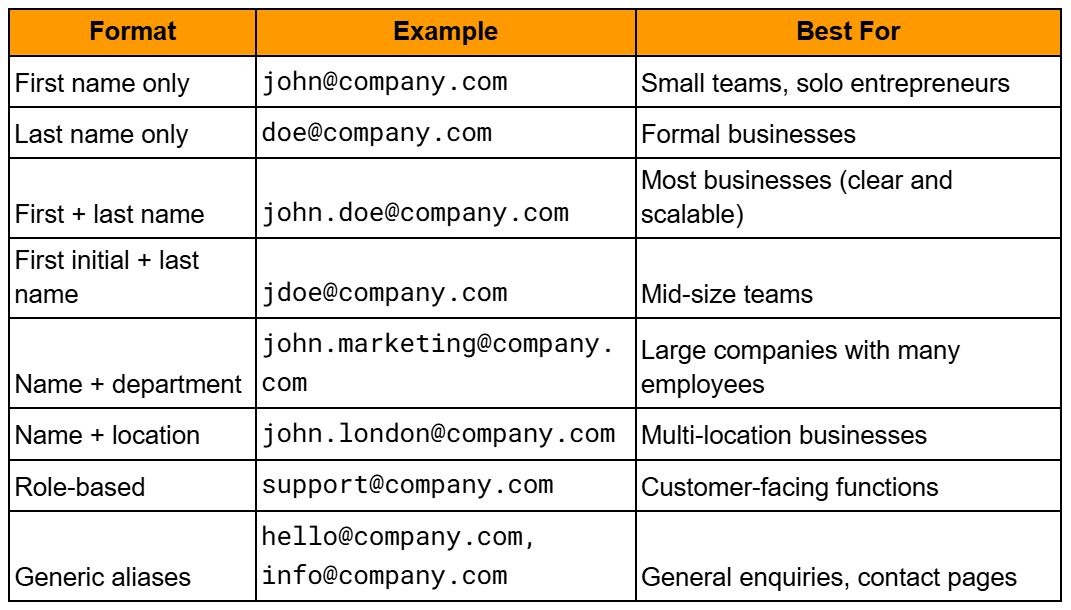
If you're creating email IDs for a business or team, choosing the right format matters. A well-structured email ID looks professional, scales as the company grows, and avoids confusion.
Common Professional Formats
Tips for Choosing the Right Format
- Use both first and last name when possible. It is clear, professional, and scales well as your team grows.
- Add a department or location keyword if multiple team members share the same first name. For example, jane.sales@company.com and jane.ops@company.com avoids duplication.
- Avoid numbers like john2@company.com. They look informal and cause confusion.
- Use a custom domain (@yourcompany.com) instead of free providers (@gmail.com) for business email. It looks more credible and gives you full control.
How to Create an Email ID List (Step-by-Step)
Building an email ID list from scratch is straightforward if you follow the right steps. Here's how to do it properly:
Step 1: Choose an Email Marketing Platform
You need a platform to store, manage, and send to your list. Popular options include:
- Mailchimp - Best for beginners, free up to 500 contacts
- ConvertKit (now Kit) - Popular with creators and bloggers
- ActiveCampaign - Powerful automation for growing businesses
- Brevo (formerly Sendinblue) - Strong free tier, good for small businesses
Each platform lets you import contacts, create sign-up forms, and send emails all in one place.
Step 2: Create a Sign-Up (Opt-In) Form
Design a simple form that captures at minimum: name and email address. Place it prominently on your:
- Homepage
- Blog posts (inline or at the end)
- About page
- Dedicated landing page
Keep it short. Every extra field you add reduces the number of people who complete it.
Step 3: Offer a Lead Magnet
People are more likely to share their email ID when they get something valuable in return. This is called a lead magnet. Good examples include:
- A free checklist or cheat sheet
- A PDF guide or ebook
- A discount code or exclusive offer
- A free mini-course or email series
- A webinar or event invitation
Match your lead magnet to the content on that specific page. A relevant offer converts far better than a generic one.
Step 4: Drive Traffic to Your Opt-In
Your form won't fill itself. Bring people to it through:
- SEO content - Blog posts that rank and include inline sign-up forms
- Social media - Link to your sign-up page from your bio, posts, and stories
- Paid ads - Run targeted campaigns directly to your landing page
- Guest posting - Publish on other sites in your niche and link back
Step 5: Organise and Segment Your List
As your list grows, organise contacts into segments (groups based on how they signed up, what they've clicked, or where they are in the buyer journey). Segmentation lets you send more relevant emails, which means higher open rates and fewer unsubscribes.
How to Build an Email ID List for Free
You don't need a big budget to grow a list. Here are proven free methods:
Use Your Social Media Bios
Add a link to your opt-in page in your Instagram, X (Twitter), TikTok, YouTube, and LinkedIn bios. It's free and visible to everyone who visits your profile.
Pin a Sign-Up Post
Pin a post on your Facebook page or X profile that highlights your lead magnet. Pinned posts get significantly more visibility than regular content.
Add a Subscribe Checkbox to Blog Comments
If you run a WordPress blog, add a checkbox under the comment form that says "Subscribe to our newsletter." Anyone who comments and checks the box gets added to your list at zero extra cost.
Publish Valuable Content Consistently
The simplest long-term strategy: write blog posts, record videos, or publish content that genuinely helps your target audience. Include an opt-in form within or at the end of each piece. When people find your content helpful, they're willing to give their email ID to receive more.
Run a Giveaway or Contest
Offer a prize relevant to your audience and require an email address to enter. Promote it through your social channels and ask participants to share. This can drive a spike of new sign-ups in a short period.
Use Exit-Intent Popups
These appear when a visitor is about to leave your site. A well-timed offer like "Wait, grab this free guide before you go!" can convert visitors who would otherwise disappear.
Best Practices for Managing Your Email ID List
A large list means nothing if it's poorly managed. Here's how to keep yours healthy and effective:
Remove Bounced Email Addresses Regularly
Keep your email list clean by regularly removing bounced email addresses with a bounce email checker. High bounce rates can harm your sender reputation and negatively impact deliverability.
Use Double Opt-In to Improve List Quality
Use double opt-in to ensure higher-quality subscribers. After someone signs up, send a confirmation email and add them to your list only after they verify their subscription. This helps maintain a cleaner list and improves engagement.
Segment Your Audience Early
Start segmenting your audience from day one. Organize contacts based on factors such as signup source, interests, location, or behavior. Even simple segments, like "blog subscribers" versus "webinar attendees," enable you to deliver more relevant and targeted email campaigns.
Follow Email Marketing Compliance Requirements
Comply with email marketing laws based on your subscribers' locations. For example, GDPR (EU/UK) requires clear consent and a simple unsubscribe process, CAN-SPAM (USA) mandates a physical mailing address and an unsubscribe option in every email, and CASL (Canada) requires express or implied consent before sending commercial messages.
Re-Engage or Remove Inactive Subscribers
Regularly re-engage or remove inactive subscribers. Consider sending a re-engagement campaign to contacts who haven't opened your emails in six months or longer. If they remain unresponsive, it's best to remove them from your list. A smaller, highly engaged audience consistently delivers better results than a large list filled with inactive subscribers.
Common Mistakes to Avoid
Buying an email ID list: It might seem like a shortcut, but purchased lists are almost always low quality, full of invalid addresses, and harvested without consent. This leads to high bounce rates, spam complaints, and potential legal issues. Never do it.
Not segmenting your list: Sending the same email to everyone (new subscribers, loyal customers, and inactive contacts alike) wastes your effort and annoys recipients. Segment early.
Ignoring mobile optimisation: Over 60% of emails are opened on mobile. If your emails look broken on a small screen, people unsubscribe. Always test emails on mobile before sending.
No clear unsubscribe option: Every email you send must include an easy way to opt out. Hiding the unsubscribe button doesn't keep people on your list. It just makes them mark you as spam.
Sending too infrequently: If months go by between emails, subscribers forget who you are. Maintain a consistent schedule. Even once a month is enough to keep your audience warm.
Conclusion
An email ID list is more than a spreadsheet of addresses. It's a direct, reliable channel to your audience that doesn't depend on algorithms or ad budgets. Whether you're building one for a business, a blog, or internal team communication, the key is to start simple, grow it organically, keep it clean, and always send content that people actually want to receive.
Start with a clear opt-in form, offer something genuinely useful in return, and let the list grow from there. A well-managed email ID list remains one of the highest-ROI assets any business or creator can own in 2026.
FAQs
What is an email ID?
An email ID is the same as an email address. It's a unique identifier in the format username@domain.com used to send and receive electronic messages. The term "email ID" is commonly used in South Asia and on forms and apps, but it means exactly the same thing as "email address."
What is the difference between an email list and a mailing list?
An email list is a digital collection of email addresses used for sending online communications. A mailing list traditionally refers to physical postal addresses, though the term is also used informally for email lists in a marketing context.
How do I get a list of email IDs for free?
Build one organically using opt-in forms on your website, lead magnets, social media CTAs, blog content, and contests. Never purchase a list. Bought lists harm your deliverability and can violate privacy laws.
What is the best format for a professional email ID?
The most professional and scalable format is firstname.lastname@yourdomain.com. For role-based or shared inboxes, use formats like support@, hello@, or sales@ followed by your company domain.
Is it legal to buy an email ID list?
In most cases, no. Under GDPR, CAN-SPAM, and CASL, sending emails to people who haven't consented to hear from you is illegal and can result in heavy fines. Always build your list with permission-based methods.
How many email IDs should be on my list?
There's no ideal number. A small, engaged list of 500 subscribers who open every email is worth far more than a bloated list of 50,000 who never do. Focus on quality over quantity.
Found this guide useful? Share it with someone building their first email list.
Start cleaning your list instantly.
No credit card required.