.jpg)
Email deliverability has become more complex than ever. Authentication protocols, sender reputation, AI-powered spam filters, and stricter mailbox provider requirements mean agencies can no longer rely on outdated tactics.
This guide covers everything agencies need to know to maximize inbox placement in 2026.
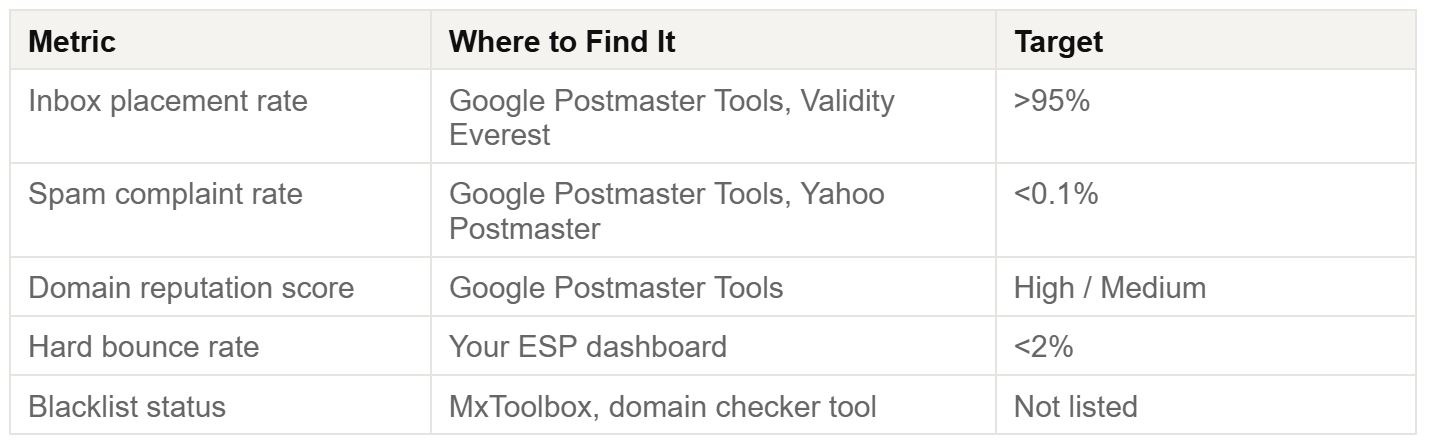
Key Deliverability Benchmarks for 2026
Why Emails Go to Spam
What's Actually Changed in 2025–2026?
Most deliverability advice online is outdated. Agencies managing campaigns for multiple clients need to understand today's requirements, not strategies from four years ago.
Google & Yahoo Bulk Sender Requirements
Since February 2024, Gmail and Yahoo require bulk senders (1,000+ emails/day) to have:
- SPF configured
- DKIM configured
- DMARC configured
- One-click unsubscribe enabled
- Spam complaint rates below 0.3% (with 0.1% considered the safest threshold)
Many agencies inherit poorly configured domains without realizing these requirements aren't met.
AI-Based Spam Filters Analyze Context
Modern spam filters evaluate:
- Subject lines
- Sender domains
- Message content
- Link structure
- Recipient engagement history
- Sending behavior patterns
Even a technically perfect email can land in spam if it's sent from a new domain to a cold audience.
Delivery vs. Deliverability: The Critical Difference
Delivery Rate
Did the receiving server accept the message?
(Typically 98–99%)
Deliverability Rate
Did the message land in the inbox rather than the spam folder?
Many ESPs only report delivery rates, leading agencies to tell clients that campaigns were "98% delivered" when inbox placement was significantly lower.
DMARC Is No Longer Optional
Mailbox providers increasingly view missing DMARC records as a warning sign.
Without DMARC:
- Domains become easier to spoof
- Brand trust decreases
- Inbox placement suffers
For bulk senders, DMARC is now a baseline requirement.
Technical Foundation
SPF, DKIM, DMARC & BIMI
These four DNS records form your email authentication stack.
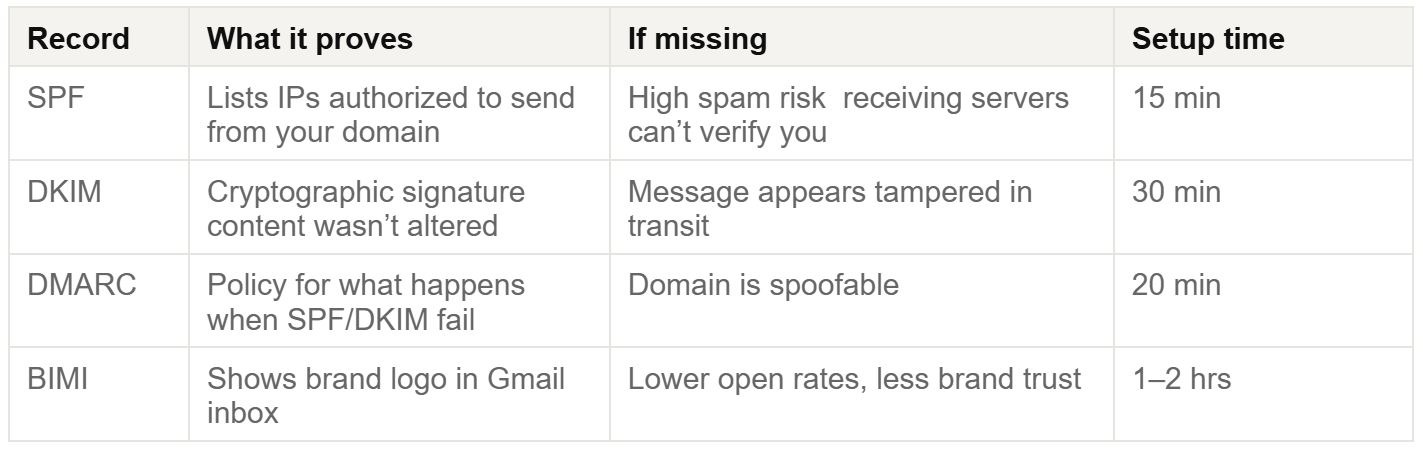
SPF: The Authorized Sender List
SPF identifies which services can send email using your domain.
Example:
v=spf1 include:_spf.google.com include:sendgrid.net ~all
Best practice: Begin with ~all (soft fail), then transition to -all once all legitimate senders are identified.
DMARC: The Policy Layer
DMARC instructs mailbox providers how to handle authentication failures.
Example:
v=DMARC1; p=quarantine; rua=mailto:dmarc@yourdomain.com; pct=100
Recommended progression:
- p=none
- p=quarantine
- p=reject
Use a Domain Checker Before Every Campaign
Verify:
- SPF
- DKIM
- DMARC
- Blacklist status
Make this part of every client onboarding process.
Sender Reputation
Your Email Credit Score
Sender reputation is the invisible score mailbox providers assign to your domain and IP address.
It is one of the strongest predictors of inbox placement.
Domain Reputation vs. IP Reputation
Domain Reputation
Measures recipient engagement with emails sent from your domain.
IP Reputation
Measures trust associated with the sending server.
On shared IPs, another sender's poor practices can negatively affect you.
Dedicated IPs eliminate this risk but require proper warmup.
Agency Scenario: Inherited Damaged Domains
If a client provides a domain with a poor sending history:
- Pause all campaigns.
- Audit the domain.
- Verify the email list.
- Warm up gradually over 30–45 days.
Do not resume full-volume sending immediately.
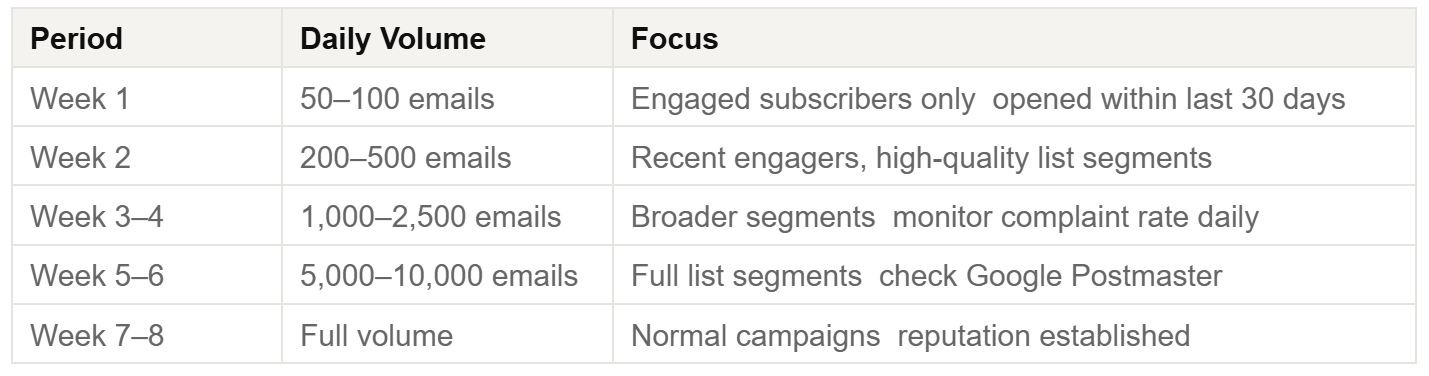
IP Warmup Schedule
Never Buy Email Lists
Purchased lists often contain spam traps.
Consequences include:
- Reputation damage
- Blacklisting
- Long-term deliverability issues
There are no shortcuts to recovery.
List Hygiene
The Most Overlooked Deliverability Factor
Poor list quality quickly destroys sender reputation.
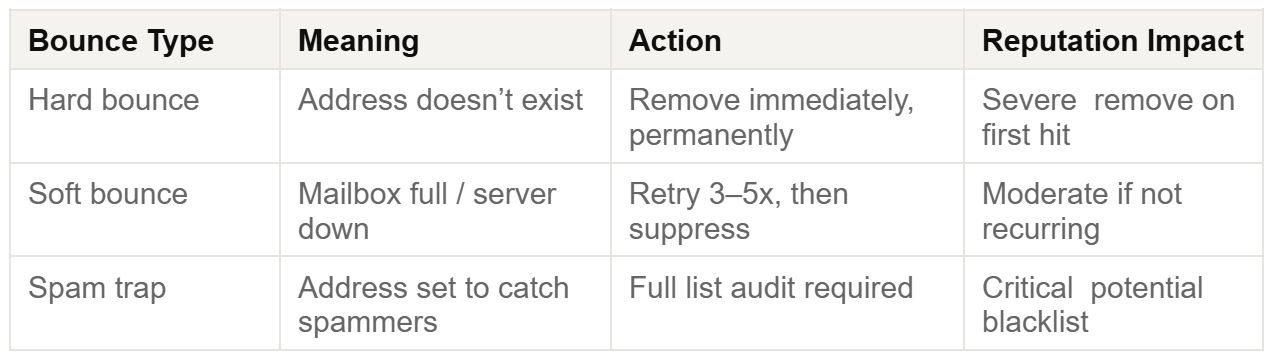
The 90–180 Day Sunset Policy
Suppress subscribers who haven't engaged within 90–180 days.
This protects reputation while preserving opportunities for future re-engagement campaigns.
Double Opt-In Is the Gold Standard
Benefits include:
- Higher engagement
- Fewer invalid addresses
- Reduced spam trap exposure
- Stronger long-term deliverability
Email Content
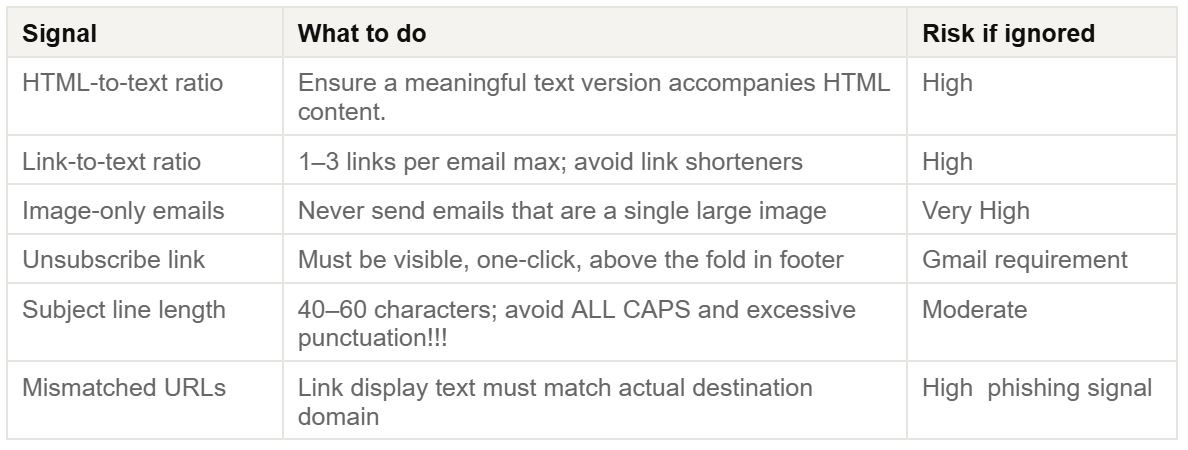
What Modern Spam Filters Evaluate
Spam filtering now considers the entire message experience.
Personalization Mistakes Hurt Deliverability
Broken personalization tokens create poor user experiences and trigger spam signals.
Instead of:
"Hey ,"
or
"Hey FNAME,"
Use fallback values for every merge field.
Agency Infrastructure
Separate Sending Domains Per Client
Never use a client's primary domain for marketing campaigns.
Recommended structure:
- marketing.clientco.com → Marketing emails
- news.clientco.com → Newsletters
- notifications.clientco.com → Transactional emails
Each subdomain develops its own reputation.
Consistency Beats Volume
Mailbox providers favor predictable sending behavior.
Sending:
- 500 emails every Tuesday appears trustworthy.
Sending:
- 10,000 emails once a month appears suspicious.
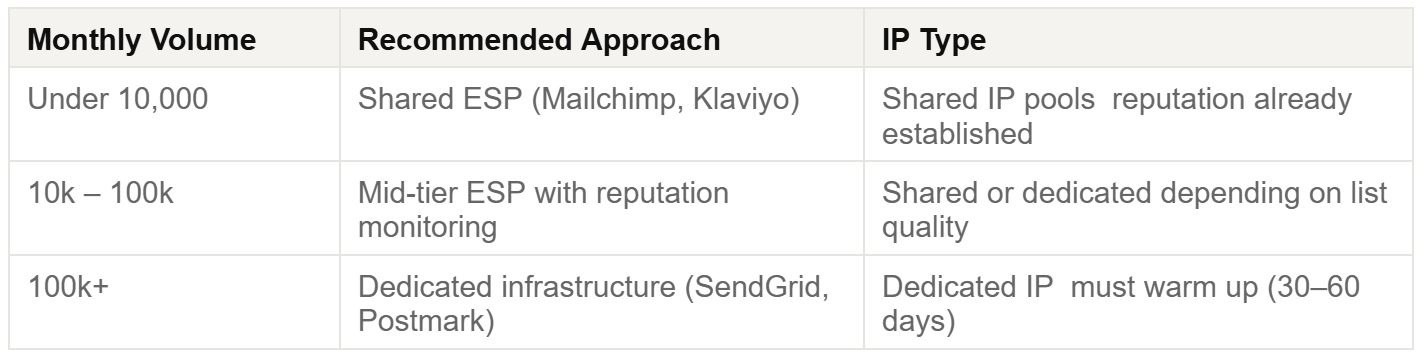
ESP Selection by Client Size
Monitoring
What to Track
Open rates alone are no longer reliable indicators.
Google Postmaster Tools
Despite being free, many agencies fail to use it.
It provides insights into:
- Domain reputation
- IP reputation
- Spam rates
- Delivery errors
- Feedback loops
Set it up for every client domain.
Turn Monitoring Into a Service
Offer monthly deliverability audits that include:
- Reputation analysis
- Blacklist monitoring
- Complaint tracking
- Bounce analysis
- Strategic recommendations
This creates recurring revenue while delivering clear client value.
Pre-Send Checklist
Authentication
☐ SPF verified
☐ DKIM enabled
☐ DMARC set to quarantine or reject
☐ DMARC reports monitored
☐ Sending from a subdomain
List Quality
☐ Email list validated
☐ Hard bounces removed
☐ Unengaged subscribers suppressed
☐ Previous unsubscribes honored
☐ All contacts opted in
Content
☐ One-click unsubscribe included
☐ Plain text version added
☐ All links verified
☐ Personalization fallbacks configured
☐ Spam testing completed
Monitoring
☐ Google Postmaster Tools configured
☐ Blacklist check completed
☐ Previous complaint rate below 0.1%
☐ Sending volume aligns with historical patterns
☐ Test emails reviewed across devices and inbox providers
Frequently Asked Questions
Why do emails go to spam even with SPF and DKIM?
Authentication alone isn't enough.
Common causes include:
- High complaint rates
- Poor list quality
- Sudden volume spikes
- Suspicious content patterns
What is a good deliverability rate?
Aim for 95% or higher inbox placement.
Remember:
- Delivery rate = server acceptance
- Deliverability rate = inbox placement
These are not the same.
How long does IP warmup take?
Most dedicated IPs require 30–60 days.
Warm up slowly and monitor reputation throughout the process.
Does deliverability affect transactional emails?
Yes.
If marketing and transactional emails share the same reputation, problems in one area can affect the other.
Separate sending infrastructure whenever possible.
How do I repair a damaged sender reputation?
- Pause sending for 2–4 weeks.
- Clean the email list thoroughly.
- Implement SPF, DKIM, and DMARC.
- Restart with a structured warmup plan.
Should agencies use dedicated or shared IPs?
Shared IPs: Best for senders under 10,000 emails/month.
Dedicated IPs: Appropriate for organizations consistently sending 50,000–100,000+ emails per month.
Dedicated IPs require ongoing volume and careful reputation management.
Final Thoughts
Deliverability isn't a one-time setup task. It's an ongoing discipline that combines technical authentication, list management, reputation monitoring, and strategic sending practices.
Agencies that master these fundamentals don't just improve inbox placement, they protect client revenue, strengthen trust, and create a valuable service offering that competitors struggle to replicate.
Start cleaning your list instantly.
No credit card required.