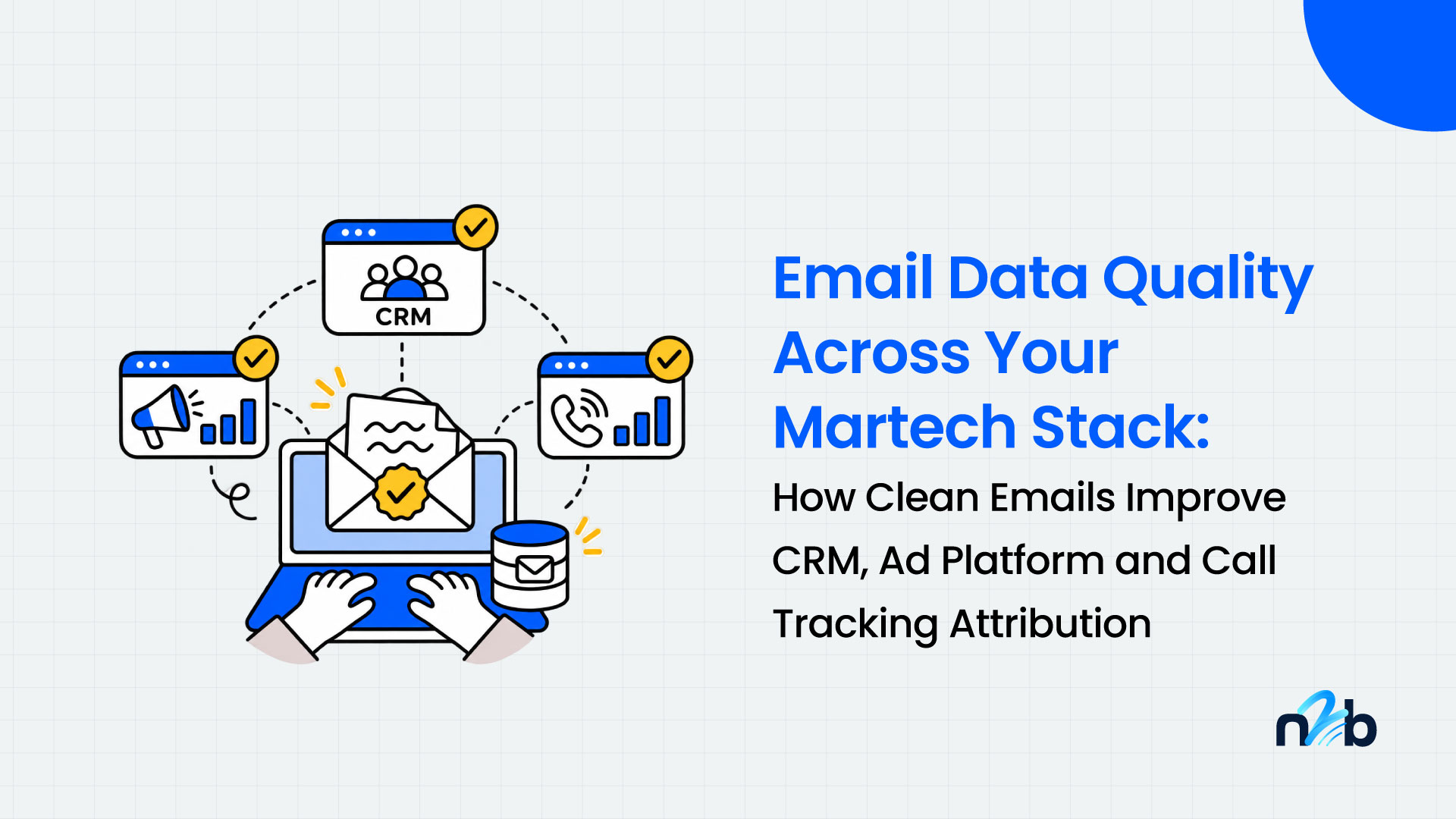
An email address is rarely used in just one place. It arrives through a web form or a phone call, lands in a CRM, syncs to an email platform, and gets exported to an ad platform as an audience or a conversion signal. If the address is wrong at the start, every tool after it works with bad data.
This guide follows one email address through a typical stack, shows where it goes wrong at each layer, and explains where to put verification checkpoints so your attribution and ad spend reports are built on data you can trust.
In short: verify email addresses at three points. When they enter your stack, before they sync or export to another tool, and on a regular schedule. Then track invalid rate by lead source so you can see which campaigns bring in bad data.
The journey of one email address
Take a home services business running paid search. A prospect clicks an ad, then either fills in a form or calls the number on the page. Either way, an email address ends up in a record. From there it moves:
- A form tool or call tracking platform captures the lead and its source.
- The lead syncs to the CRM, where it is deduplicated or merged with an existing contact.
- The CRM feeds an email platform for follow-up and nurture.
- A segment of the CRM is exported to an ad platform as a customer list, or used to send offline conversions back.
- Reporting joins all of this to show which campaigns produced revenue.
Each handoff is also a place where bad data gets copied, not fixed. Integrations and automation tools move records quickly, and they rarely check whether the email address is real. For example, Zapier lists an automation that adds new CallRail form captures to a Google Ads customer list, and CallRail has a native integration that creates or updates Constant Contact contacts from tracked calls and texts. Those are useful workflows, but a mistyped address passes straight through them into your email list and your ad audiences.
Where bad email data enters, and where to verify
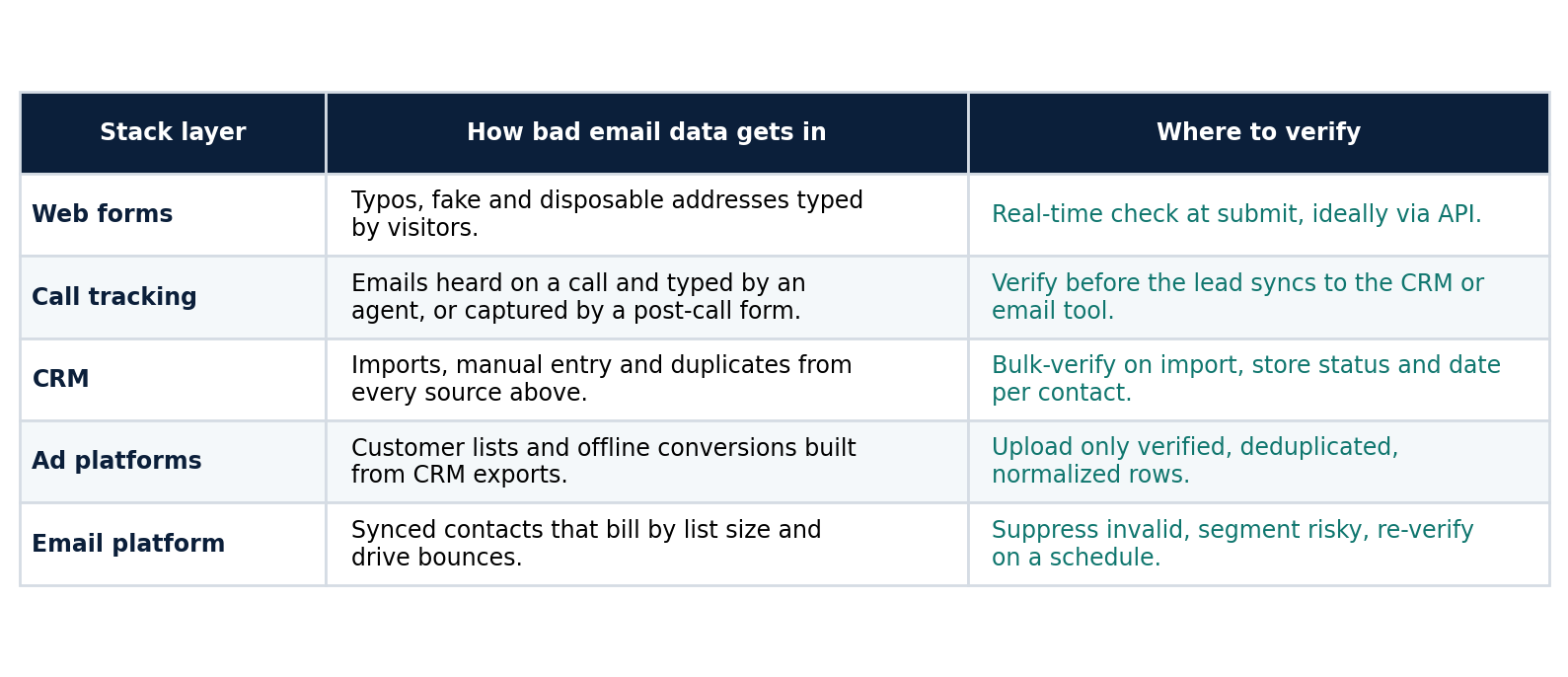
Table: five layers of a martech stack, how bad email data gets in, and where to add verification.
Layer by layer
1. Web forms and landing pages
This is the cheapest place to fix the problem. Visitors mistype addresses, use throwaway inboxes to get a download, or enter fake ones. Real-time verification through an API catches these at submit, so you can ask the person to correct the address while they are still on the page.
2. Call tracking and phone-originated leads
Phone leads add a data quality risk that web forms do not. An email address spoken on a call is heard, interpreted and typed by a person, so spelling errors are easy to make, and a post-call form still relies on the caller to type correctly. Some records arrive with a phone number and no email at all.
Verify addresses from call tracking before they sync to the CRM or email tool, and keep phone-only leads in a separate segment. A lead with a bad email is not a worthless lead, because the phone number may still work. The point is to stop sending email and building audiences from addresses that cannot receive anything.
3. The CRM
The CRM collects addresses from every other source, plus imports and manual entry. It is also where duplicates multiply. Two records for one buyer, one with a typo, split the campaign history and make attribution reports harder to trust.
Add fields that make verification visible and reusable:
- Email status: valid, invalid, risky, catch-all, unknown.
- Verified date: so you know when to re-check.
- Lead source: so you can compare data quality by channel.
Then use the status field as a filter in every export, sync and send.
4. Ad platforms
Customer lists and offline conversion uploads are only as good as the CRM data behind them. Platforms match on normalized, hashed email addresses, so an invalid or badly formatted address cannot match. Export verified, deduplicated records only, and refresh audiences on a schedule instead of syncing the whole CRM once and forgetting it.
Verification does not guarantee a match, since a valid address may not belong to a user on that platform. It removes rows that could never match, so the match rate you see reflects the real audience. We cover this in more detail in our Email List ROI guide (/blog/email-list-roi-clean-data-attribution-ad-spend).
5. The email platform
Many email platforms bill by contact count, and every bounce affects sender reputation. Suppress invalid addresses, put catch-all and risky ones in their own segment, and re-verify before large sends. For the deliverability side, see our guides on reducing email bounce rate (/blog/how-to-reduce-email-bounce-rate) and handling catch-all emails (/blog/catch-all-emails).
Measure data quality by lead source
Most teams track cost per lead. Add one more column: the share of leads with a valid email. Then calculate cost per valid lead:
Cost per valid lead = ad spend ÷ (leads × valid email rate)
Here is an illustration with made-up numbers. Replace them with your own.
- Campaign A: $5,000 spend, 250 leads, 20 percent invalid. Reported cost per lead is $20.00. Cost per valid lead is $25.00.
- Campaign B: $5,000 spend, 220 leads, 3 percent invalid. Reported cost per lead is $22.73. Cost per valid lead is $23.43.
On cost per lead, Campaign A looks better. On cost per valid lead, Campaign B wins. If you optimize the budget on the first number, you can keep funding the source that sends you more unreachable contacts.
Keep one caveat in mind. For call-driven leads, a bad email does not mean the lead has no value, so compare email-reachable leads and phone-reachable leads side by side rather than discarding the rest.
This matters most for agencies. Showing clients invalid rate by source turns a vague "lead quality" conversation into a number, and it gives you a clear reason to change a form, a script or a targeting setting.
A practical checklist
- Map every entry point where an email can enter your stack, including phone leads, imports and manual entry.
- Verify at capture on forms with an API, and before sync for anything that arrives through automation.
- Bulk-verify the existing CRM once to set a baseline invalid rate.
- Add status, verified date and source fields to every contact.
- Filter exports and syncs to verified records before they reach ad platforms or email tools.
- Handle catch-all and risky addresses as a separate segment, not as valid or dead.
- Report invalid rate and cost per valid lead by source each month.
- Re-verify on a schedule and before every large send or audience refresh.
No2Bounce offers bulk verification, an API and integrations with tools such as HubSpot and Klaviyo, so you can place checkpoints in the layers above (check the integrations page for the current list).
Common mistakes
- Trusting integrations to clean data. They move records. They do not validate them.
- Verifying once at import. Data decays and new sources keep arriving.
- Ignoring phone-originated leads. Spoken emails are one of the weakest points in the stack.
- Syncing the full CRM to ad platforms. Filter by status and recency first.
- Reporting only cost per lead. It hides the cost of unreachable contacts.
FAQ
Why does email data quality matter for marketing attribution?
Attribution depends on joining records across tools, and the email address is often the shared key. A mistyped or invalid address can split one buyer across records or stop a conversion signal from matching, so revenue is credited to the wrong channel or to none.
Should I verify emails from call tracking leads?
Yes, before they sync to your CRM or email platform. Addresses captured over the phone are typed by a person, so errors are more likely. Keep phone-only leads in their own segment instead of discarding them.
Where in my stack should email verification happen?
At entry (forms and lead capture), before any sync or export to another tool, and on a recurring schedule. The earlier the check, the fewer systems hold the bad address.
What is the cost per valid lead?
It is ad spend divided by the number of leads with a valid email address. It shows what you pay for reachable contacts, which can rank campaigns differently than cost per lead does.
Start cleaning your list instantly.
No credit card required.