.jpg)
If your emails have started bouncing, landing in spam, or getting deferred without explanation, an email blacklist (increasingly called a “blocklist”) is one of the first things worth ruling out. This guide covers what these lists actually are, how to check your status without needing a dedicated tool, why senders end up listed, and, the part most guides skip, the actual step-by-step process for getting delisted from the databases that matter, including Spamhaus.
What Is an Email Blacklist (Blocklist)?
An email blacklist is a database that tracks IP addresses or domains associated with spam, malware, or abusive sending behavior. When a receiving mail server gets an incoming message, it can check the sender's IP or domain against one or more of these lists in real time. If there's a match, the message may be rejected outright, silently dropped, or routed straight to the spam folder.
A naming note: most of the organizations that run these databases, including Spamhaus, have shifted from “blacklist” to “blocklist” in their own documentation, partly to move away from language with racial connotations and partly because “blocklist” more accurately describes what's happening (blocking a connection, not maintaining a list of “bad” entities in a broader sense). You'll see both terms used interchangeably across the industry, including in this guide, since “blacklist” remains the term most people search for.
IP Blacklist vs. Domain Blacklist: the Distinction That Matters Most
- IP blacklists (DNSBLs) track the sending server's IP address. These are queried at connection time, before the receiving server even accepts the message. Spamhaus's SBL, XBL, and PBL, along with Barracuda and SpamCop, all work this way.
- Domain blacklists (URIBLs) track domains that appear inside the body of a message, typically links, rather than the sending IP. Spamhaus DBL, SURBL, and URIBL fall into this category. A domain can end up here even if the sending IP is completely clean, because the flagged domain is the one being linked to, not necessarily the one sending the mail.
This distinction matters operationally: if you rotate sending IPs but keep linking to the same domain, a domain-level listing follows you. If your domain is clean but a shared IP on your ESP gets flagged, that's an IP-level problem you may not be able to fix yourself.
How to Check If You're Blacklisted (No Tool Required)
You don't need a dedicated blacklist-checker product to find out where you stand. A DNSBL lookup is just a DNS query, and you can run one manually.
Step 1: Find the sending IP
Open the full headers of an email you sent (in Gmail: “Show original”; in Outlook: “View message source”). Look for the topmost Received: line, which shows the IP address of the server that sent the message.
Step 2: Reverse the IP octets
DNSBLs are queried by reversing the IP address. If your IP is 192.0.2.10, you reverse it to 10.2.0.192.
Step 3: Query the blocklist's DNS zone
Using a terminal, run a lookup like:
dig 10.2.0.192.zen.spamhaus.org
- No answer / NXDOMAIN means you're not listed in that zone.
- A response starting with 127.0.0.x means you're listed, and the specific code tells you which sub-list you're on (Spamhaus publishes a return-code reference for zen.spamhaus.org).
Repeat this against each blocklist's zone (for example bl.spamcop.net, b.barracudacentral.org) to get a fuller picture. For domain-level checks, query the domain against dbl.spamhaus.org the same way.
This manual method works fine for a one-off check. If you're monitoring regularly, most senders eventually move to either a scheduled script that runs these lookups automatically, or a monitoring tool that alerts you the moment a new listing appears, which matters because the gap between getting listed and noticing is often where the real deliverability damage happens.
Major Blacklist Databases: What Triggers Each One
Not every blacklist carries the same weight. Here's how the ones senders encounter most often compare.
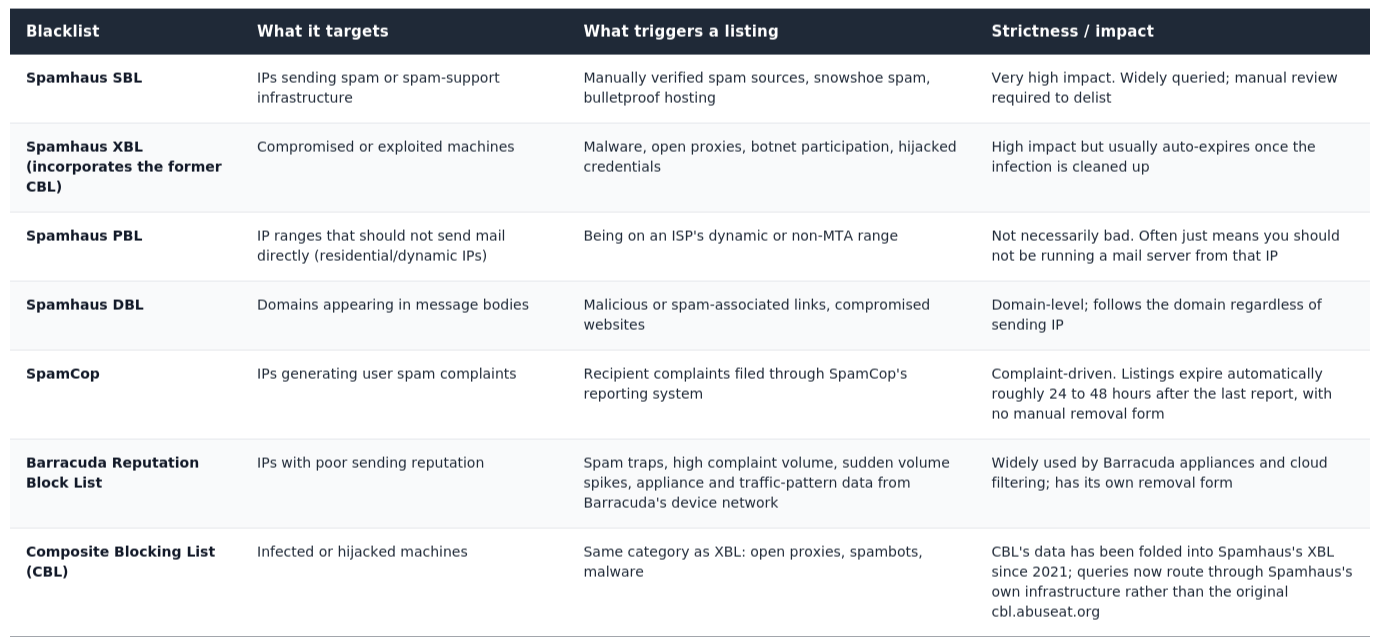
A note on SORBS: if a blacklist checker reports a SORBS listing, treat it with suspicion. Proofpoint, which owned SORBS, shut the service down and emptied its DNS zones in mid-2024. Any tool still surfacing a SORBS “hit” is reading stale, cached data rather than a live listing, and it's worth confirming with the tool vendor whether their list of sources is current before you spend time chasing a removal that no longer exists.
Why You Got Blacklisted
Most listings trace back to one of a handful of root causes:
- Spam complaints. Recipients marking your mail as spam, especially in bulk or in a short window, is one of the fastest paths to a listing. This is literally how SpamCop's model works.
- A compromised server or account. Malware, an exploited plugin, or a hijacked email account can turn your infrastructure into a spam source without your knowledge. This is the CBL/XBL pattern: automated detection, not human judgment.
- Sudden volume spikes. A dramatic, unannounced jump in sending volume, even for legitimate campaigns, can look like abuse to systems trained on gradual, consistent patterns. This is a common trap for anyone launching a large campaign without a warm-up period.
- Spam traps. Sending to a pristine spam trap (an address that never opted in, planted specifically to catch harvested or purchased lists) or a recycled trap (a formerly real address that's been repurposed after prolonged inactivity) signals list-hygiene problems. This is one of the clearest reasons to verify and clean your list before sending rather than after a listing forces the issue.
- Poor list hygiene generally. High bounce rates, unengaged segments, and outdated opt-ins all push your reputation in the wrong direction even before a formal listing occurs. If you're dealing with catch-all addresses inflating your list with unverifiable contacts, that's worth resolving as part of the same cleanup. See No2Bounce's guide to handling catch-all email addresses.
- A poisoned shared IP. If you send from a shared ESP IP, another sender's bad behavior can get that IP listed regardless of your own practices.
Step-by-Step: the Blacklist Removal (Delisting) Process
This is where most guides get vague. The process below applies broadly, with notes on where specific blocklists diverge.
Step 1: Identify Exactly Which List You're On
Don't assume, confirm. Run the DNSBL lookup method above, or check the operator's own lookup tool directly (Spamhaus's IP and Domain Reputation Checker, Barracuda Central's lookup, SpamCop's lookup). Spamhaus in particular runs several distinct sub-lists (SBL, XBL, PBL, DBL) with different removal paths, so treating “Spamhaus” as one generic list wastes time on the wrong form.
Step 2: Stop Sending and Diagnose the Root Cause
If mail is still going out while you investigate, pause campaigns from the affected IP or domain. Continuing to send during an active listing generally slows down removal and, in some cases, extends it. Most operators verify the underlying issue is resolved before they'll process a request, and ongoing bad traffic makes that verification fail.
Look at what changed recently: a new list segment, a modified sending pattern, a new integration, or a server-side change. For infection-related listings (XBL/CBL), run a malware scan, check for open proxies, and audit any web applications or plugins on the sending server for known vulnerabilities.
Step 3: Fix the Underlying Problem Completely
This step is where most delisting requests fail. A request that states you're “compliant now” without evidence of an actual operational change, a cleaned list, patched software, revoked compromised credentials, or corrected authentication, gives the list operator little reason to act. Document what specifically was fixed, since most manual-review processes (Spamhaus SBL, Barracuda) ask for this in the request itself.
Step 4: Submit the Removal Request Through the Correct Channel
The path differs by blocklist and by listing type:
- Spamhaus SBL: requires going through the SBL Team directly; for many IP ranges, the network operator or ISP responsible for the IP needs to submit the request, not the individual sender.
- Spamhaus XBL / PBL: generally self-service through Spamhaus's own lookup and removal tools, since these are automated listings tied to a detectable condition (infection, dynamic-range status) rather than manual review.
- Spamhaus DBL: domain-level removal, separate from any IP-level request; relevant if a domain in your message body (not your sending IP) is the flagged entity.
- Barracuda: submit through the Barracuda Central lookup and removal form, with a clear explanation of the cause and the fix.
- SpamCop: there is no manual removal form. Listings are time-based: they expire after a window with no new complaints, and each new complaint restarts that clock. The only lever you have is to stop generating complaints.
- CBL-related listings: now handled through Spamhaus's own XBL tools rather than the legacy cbl.abuseat.org process.
If your ISP or hosting provider controls the IP range, loop them in early. Several of the highest-impact listings (Spamhaus SBL in particular) can only be actioned by the entity that controls the IP allocation, not by an individual sender using it.
Step 5: Wait, Monitor, and Confirm
Once submitted, re-check the specific list (not a third-party aggregator, which may cache stale results) until it clears. Expect a short reputation-rebuild window after delisting before deliverability fully normalizes, since receiving servers that had started routing your mail to spam or junk don't necessarily reset that scoring instantly.
How Long Does Blacklist Removal Take?
There's no single universal timeline, and any source giving you an exact number for every scenario is guessing. That said, based on how each list operates, here are the general ranges senders typically report:
- Spamhaus SBL/XBL: often processed within roughly 1 to 3 days for legitimate requests once the underlying issue is confirmed fixed, but SBL specifically has no fixed SLA, and complex or contested cases can take longer.
- Barracuda: commonly resolved within about half a day to a full day for first-time listings.
- SpamCop: auto-expires roughly 24 to 48 hours after the last complaint, assuming no new reports come in during that window.
- Domain-level or infrastructure-level listings (for example Spamhaus DROP, hijacked netblocks): these can take longer, potentially several days to weeks, because they often require your ISP or network operator to act rather than you directly.
Treat these as ranges, not guarantees. The single biggest factor in how fast you clear a listing is how completely you've fixed the root cause before requesting removal. A rushed or incomplete request is the most common reason removals get delayed or rejected outright.
Preventing Future Blacklisting
Delisting solves today's problem. These practices reduce how often you face it again:
- Authenticate your mail properly. SPF, DKIM, and DMARC are close to table stakes at this point. Without them, you're both more likely to be flagged as suspicious and more vulnerable to spoofing that damages your domain's reputation on your behalf. If you haven't locked this down, it's worth pairing with No2Bounce's guide to preventing email spoofing.
- Verify your list before you send, not after a listing forces you to. Removing invalid addresses, known spam traps, and unverifiable catch-all addresses before a campaign goes out is far cheaper than recovering from a blacklisting. See No2Bounce's list cleaning guide for the specific workflow.
- Monitor engagement, not just delivery. Consistently low opens, high unsubscribes, and rising complaint rates are leading indicators of a future listing. They show up before the blacklist does.
- Warm up new domains and IPs gradually. Sudden volume spikes from a brand-new sending identity look like abuse to automated detection systems even when the campaign itself is entirely legitimate.
- Set up ongoing blocklist monitoring. Whether that's a scheduled DNSBL script using the manual method above, or a dedicated email blocklist monitoring tool, the goal is the same: catch a listing within hours, not when a customer tells you your emails never arrived.
FAQ
What's the difference between a blacklist and a blocklist?
They refer to the same thing. Most operators, including Spamhaus, now use “blocklist” in their own documentation, both to avoid language with racial connotations and because it more precisely describes the function (blocking a connection or message) rather than implying a list of inherently “bad” senders. “Blacklist” remains the more commonly searched term.
Can I get blacklisted without any warning?
Yes. Automated listings (Spamhaus XBL, CBL-derived listings, SpamCop) are triggered by detection systems the moment a threshold or pattern is matched, there's no notification before the fact. The first sign is usually a delivery problem, which is why proactive monitoring catches it faster than waiting for bounce reports.
Does verifying my email list prevent blacklisting entirely?
It substantially reduces your risk but doesn't eliminate it. List verification removes invalid addresses and many known spam traps, addressing one of the most common causes of listing. It won't protect you from a compromised server, a hijacked account, or a shared IP that another sender poisoned; those require separate security and infrastructure practices.
If I switch IP addresses, does that clear a blacklisting?
It depends on the type of listing. An IP-level listing (Spamhaus SBL/XBL, Barracuda, SpamCop) stays with the old IP; moving to a clean IP can help, provided the root cause was IP-specific (like a compromised server) rather than something that will follow you. A domain-level listing (Spamhaus DBL, URIBL, SURBL) follows the domain, not the IP, so switching sending infrastructure won't resolve it on its own.
Start cleaning your list instantly.
No credit card required.