You set up DKIM once, saw "pass" in a test email, and moved on. That is how most teams treat it, and it is why the same key can sit in DNS for years. DKIM key rotation is the routine step of replacing your signing key with a new one, and it is easy to forget because nothing visibly breaks when you skip it.
In short: rotate your DKIM keys about every six months, use 2048-bit keys, publish each new key under a new selector, and only retire the old one after mail has passed with the new one. The steps are below.
What DKIM key rotation is, and why it matters for deliverability
DKIM (DomainKeys Identified Mail) lets a receiving server check that a message was signed by the domain it claims to come from. Your sending system signs each message with a private key. The matching public key sits in your DNS under a name called a selector, for example selector1._domainkey.yourdomain.com.
Key rotation means generating a new key pair, publishing the new public key, switching your signing to it, and retiring the old key. Rotation matters for two reasons:
- Security. A private key that never changes is a long-lived credential. If it leaks, someone can sign mail as your domain until you replace it. Regular rotation limits how long a leaked or weak key stays useful.
- Authentication hygiene. Old selectors, forgotten tools and weak key sizes pile up over time. Rotation forces you to find them.
There is also an operational angle. DKIM is one of the signals that DMARC relies on, so a stale or broken key can weaken your whole authentication setup, not just one check. Teams that rotate on a schedule also tend to know exactly which tools send on their behalf, which makes every later authentication change easier.
Authentication is also a baseline requirement for reaching the inbox. Google requires every sender to authenticate with SPF or DKIM, and bulk senders must pass SPF, DKIM and DMARC. A DKIM setup that quietly breaks costs you more than the ten minutes it takes to maintain.
How often should you rotate DKIM keys?
The common guidance, drawn from M3AAWG recommendations, is every six months for most production domains. Some organizations rotate once a year. One deliverability source notes that annual rotation falls outside the six-month recommendation, so treat 12 months as the longest reasonable interval and document why if you choose it.
Key length matters as much as frequency. RFC 8301 sets 1024 bits as the minimum for RSA DKIM keys and recommends at least 2048 bits. Use 2048-bit keys for every new selector.
There is one practical catch. A 2048-bit public key makes a long DNS record, and DNS TXT strings are limited to 255 characters each. Most DNS providers split the value into several quoted strings automatically. If yours does not, you need to split it yourself. If a sender truly cannot publish a 2048-bit key, a 1024-bit key is still better than no DKIM, but plan to move off it.
Is your DKIM overdue? A 10-minute audit
Before you rotate anything, find out what you have:
- List your sending sources. Include your email service provider, CRM, help desk, billing system, cold email mailboxes and any internal servers.
- Find each selector. Send a test message from each source to a mailbox you control, open the full headers and look at the DKIM-Signature line. The s= value is the selector and d= is the signing domain.
- Look up the record. Use a DKIM lookup tool to check that selector._domainkey.yourdomain.com exists and to see the key size.
- Flag problems. Note any key under 2048 bits, any selector nobody owns, and any record you cannot match to a live tool.
If you cannot say when a key was last changed, assume it is overdue.
How to rotate a DKIM key, step by step
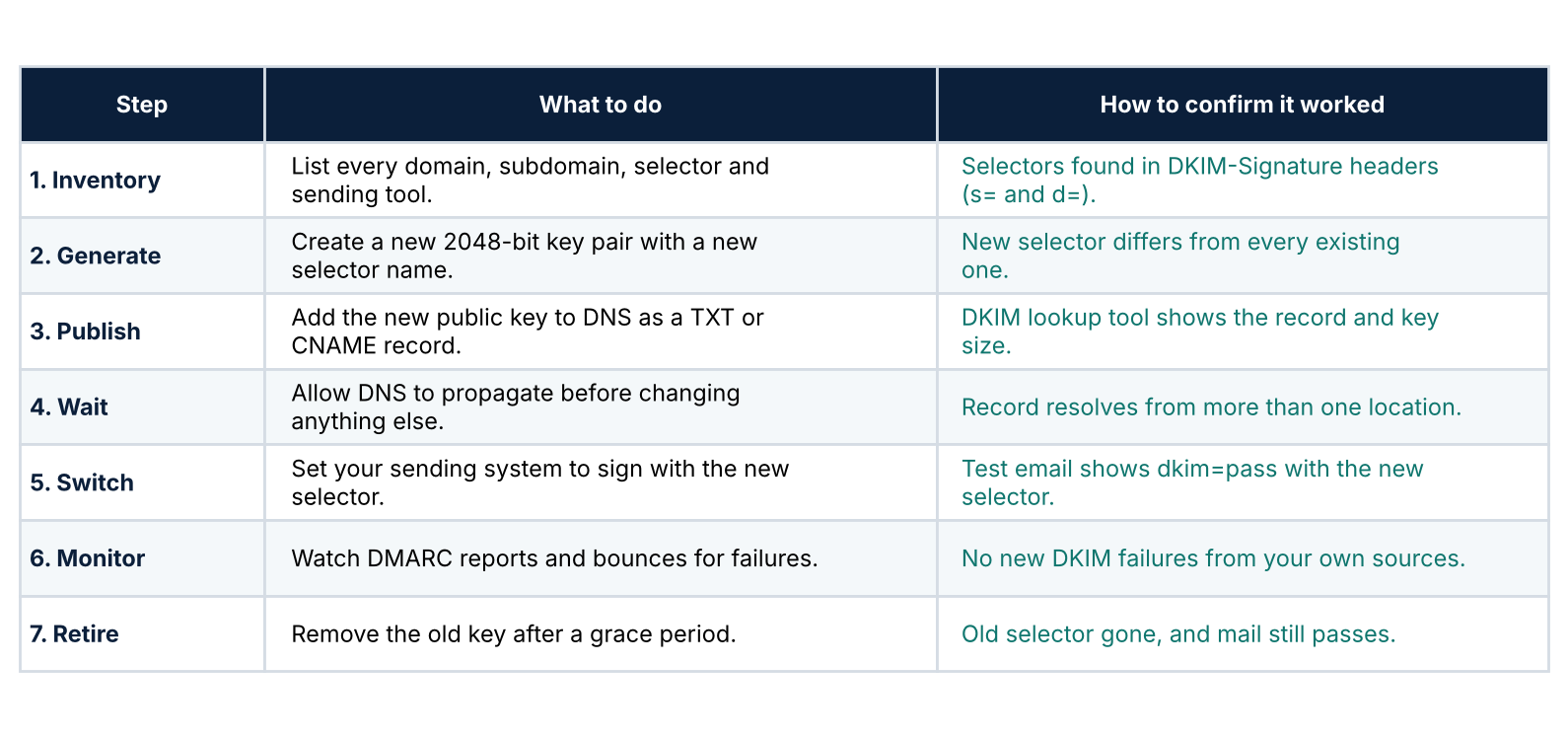
Table: seven steps to rotate a DKIM key without breaking authentication, with a check for each step.
The principle behind every step is that the old and new keys overlap. You never edit a key in place. You add a new selector next to the old one, move signing across, and remove the old one last.
Grace period. Keep the old key published for a while after you switch, so messages that were signed before the change but delivered late still validate. Common guidance is several days to a week. Confirm the recommendation with your email provider.
A sample twice-a-year calendar:
- First week of January and July: publish the new selector.
- After DNS has propagated: switch signing and send test emails to confirm a pass.
- Following two weeks: monitor DMARC reports and bounces.
- End of the grace period: remove the old selector.
What to do if DKIM fails after you switch
Failures right after a switch are common, and they are easy to reverse because the old key is still published. That is the reason for the overlap.
- Roll back first. Point your sending system back to the old selector so mail passes again, then investigate without pressure.
- Check the selector name. A typo between the selector in your sending system and the one in DNS is the most common cause.
- Check the DNS record. Look for a missing or broken value, an extra space, or a long key that was not split into valid TXT strings.
- Check that the keys match. The private key in your sending system must be the pair of the public key in DNS. Regenerating a key without updating DNS breaks it.
- Check the signing domain. If the d= domain in the signature does not align with your From domain, DMARC alignment can fail even when the signature itself is valid.
It is tempting to ignore a DKIM failure if SPF is still passing. DMARC can pass on aligned SPF alone, but you lose your second layer of protection. Forwarded mail often breaks SPF, so DKIM is frequently what keeps it authenticated.
Rotating keys with third-party senders
Most teams do not control every key themselves. How you rotate depends on how each tool signs your mail:
- Provider-managed keys with CNAME delegation. You publish CNAME records that point to your provider, and the provider rotates the underlying keys. Several large providers rotate automatically, so check whether this is already happening before you do anything.
- Keys you publish yourself. Common with Google Workspace and Microsoft 365 mailboxes, and with some email platforms. You generate the key in the admin console or the platform, publish it in DNS and switch. Check each vendor's current documentation for the exact process.
- Several tools on one domain. Each source has its own selector, so rotate them one at a time. Changing everything on the same day makes failures hard to trace.
Cold email teams that send from many mailboxes and domains have the most to keep track of. A simple sheet with one row per domain, selector, key size and last rotation date is enough to keep this from slipping. If you spin up new sending domains regularly, set the key size and a rotation date on day one, rather than trying to catch up across dozens of domains later.
Make rotation a routine, not a project
DKIM rotation gets forgotten because nobody owns it. Fix that with three small habits:
- Assign an owner. One named person or team is responsible for each domain, even if the work is shared.
- Keep a simple record. One row per domain and selector, with the sending tool, key size, date created and date of the next rotation.
- Put the date in a calendar. Two recurring reminders a year are enough. Link the reminder to the record so the person who gets it knows where to start.
Add a quick check to your onboarding process as well. Whenever someone adds a new tool that sends mail on your behalf, record its selector at the same time. That one step prevents most orphaned keys.
Common DKIM rotation mistakes
- Removing the old key too early. Delayed mail signed with the old key then fails validation.
- Overwriting the existing selector. There is no overlap, so mail can fail the moment DNS changes.
- Forgetting a sending tool. The one nobody remembers is usually the one that breaks.
- Broken DNS formatting. Long 2048-bit keys that are not split into valid TXT strings will not resolve.
- Skipping the check. Not sending a test email and not watching DMARC reports afterward.
- Ignoring subdomains. Mail sent from a subdomain may use a different selector.
Authentication gets you in the door. List quality decides what happens next
A correctly signed message proves who sent it. It does not make the recipient want it. Mailbox providers also watch how people react: bounces, spam complaints and engagement. Google's sender guidelines say to keep your reported spam rate in Postmaster Tools below 0.10% and avoid ever reaching 0.30%.
That is why authentication and list quality work as a pair. You can have flawless DKIM, SPF and DMARC and still damage your reputation by mailing invalid, risky or disposable addresses. Two guides to read next: how to reduce your email bounce rate and no-reply, role-based and disposable emails.
Authentication is a maintenance task you do twice a year. List verification is a habit you do before every send.
FAQ
Does DKIM key rotation cause downtime?
Not if you overlap the keys. Publish the new selector first, switch signing once it resolves, and keep the old key published for a grace period. Downtime usually comes from replacing a key in place or removing the old one too soon.
How often should I rotate DKIM keys?
About every six months for most production domains, based on M3AAWG guidance. Twelve months is the longest interval most guides treat as acceptable.
Is a 1024-bit DKIM key still okay?
It is still supported and better than having no DKIM, but 2048-bit is the recommended length for new keys. Plan to upgrade 1024-bit keys at your next rotation.
Do I need to rotate keys for every tool that sends my email?
Yes, for every source that signs with your domain. Providers using CNAME delegation may rotate automatically, so confirm that first. Rotate other sources one at a time.
How do I check that DKIM is passing?
Send a test email to a mailbox you control and open the full headers, or use your mailbox provider's "show original" view, and confirm DKIM shows a pass for your domain. Then review your DMARC reports for failures over the next few weeks.
Related reading: why valid addresses can still hurt sender reputation, and how bad email data affects attribution across your stack.
Clean the list before your next send
Keys protect your identity, and list hygiene protects your reputation. Run your list through No2Bounce to find invalid and risky addresses before you send.
Start cleaning your list instantly.
No credit card required.